The short answer
BitBooks shows Bitcoin amounts four different ways, and you pick which one your organization uses:
| Mode | Same amount looks like |
|---|---|
| BTC High Precision | BTC 0.00050000 |
| BTC Consequence (default) | BTC 0.00050 000 |
| Bitcoins | 0.0005 Bitcoin |
| Satoshis | 50,000 sats |
All four are correct. They're just different ways of writing the same amount. Which one you pick depends on how you think about Bitcoin, and that varies by person, by team, and by use case.
Why this exists
Bitcoin is unusual: the smallest unit (a satoshi) is 100 millionth of the largest unit (a BTC). Compare to dollars, where the smallest unit (a cent) is just one hundredth of a dollar.
That means a Bitcoin amount can span eight decimal places. 0.00050000 BTC is a perfectly normal price for, say, a coffee. Try writing that on a receipt without making someone's eyes glaze over.
Different parts of the Bitcoin world handle this differently:
- Lightning developers and merchants think in satoshis. A coffee is "5,000 sats." Easy to read, no decimals. The same way a US merchant says "$5" instead of "$0.0000... of a million dollars."
- Long-term holders and treasuries think in BTC. They're moving 0.5, 1, 2 BTC at a time. Whole numbers are easier than 8-figure satoshi counts.
- Spreadsheet-trained accountants want BTC with consistent decimal places so columns line up. "BTC 0.00050000" is awkward to read but adds up nicely when you stack 50 of them in a report.
There's no universal right answer. So BitBooks lets you pick.
What each mode does, with the same example
Let's take an amount: fifty thousand satoshis. Same Bitcoin in all four cases, just displayed differently.
BTC High Precision
BTC 0.00050000
Eight decimal places, always. Use this when:
- Your accountant insists on the most-precise standard format
- You're exporting to systems that expect a fixed BTC format
- You're auditing. Having every value in the same shape makes mismatches obvious
Pros: unambiguous, consistent across reports. Cons: ugly to read for everyday amounts. A 50,000-sat coffee shouldn't need eight decimals.
BTC Consequence (this is the default)
BTC 0.00050 000
Same eight decimal places, but BitBooks adds a thin space every five digits to make it scannable. The pattern matches how some Bitcoin Core conventions display amounts. Use this when:
- You want full precision but hate squinting at long decimal strings
- You're showing reports to clients who are mildly Bitcoin-literate
- This is a sensible default if you don't have strong feelings
Pros: readable, full precision, professional. Cons: still asks the reader to count zeros.
Bitcoins
0.0005 Bitcoin
BTC with the trailing zeros removed and the word "Bitcoin" written out. Use this when:
- You're moving meaningful BTC amounts (0.5, 1, 5 BTC) and the trailing zeros aren't useful
- You're explaining a transaction to someone non-technical
- You want the cleanest visual
Pros: cleanest, most natural for human conversation. Cons: trailing-zero loss can hide precision in tiny amounts (0.00000001 BTC vs 0.00000010 BTC could look the same in casual reading).
Satoshis
50,000 sats
The amount in sats, with thousands separators (50,000 not 50000). Use this when:
- You operate primarily in Lightning, where most amounts are under 100,000 sats
- Your team thinks in sats and finds BTC formatting cumbersome
- You're a developer or merchant where "$5 = 5,000 sats" is your everyday math
Pros: integers only, no decimals to worry about, matches how most Lightning UIs display amounts. Cons: large amounts get long fast (1 BTC = 100,000,000 sats, that's a lot of digits).
How to change it
The setting lives at Admin → Settings.
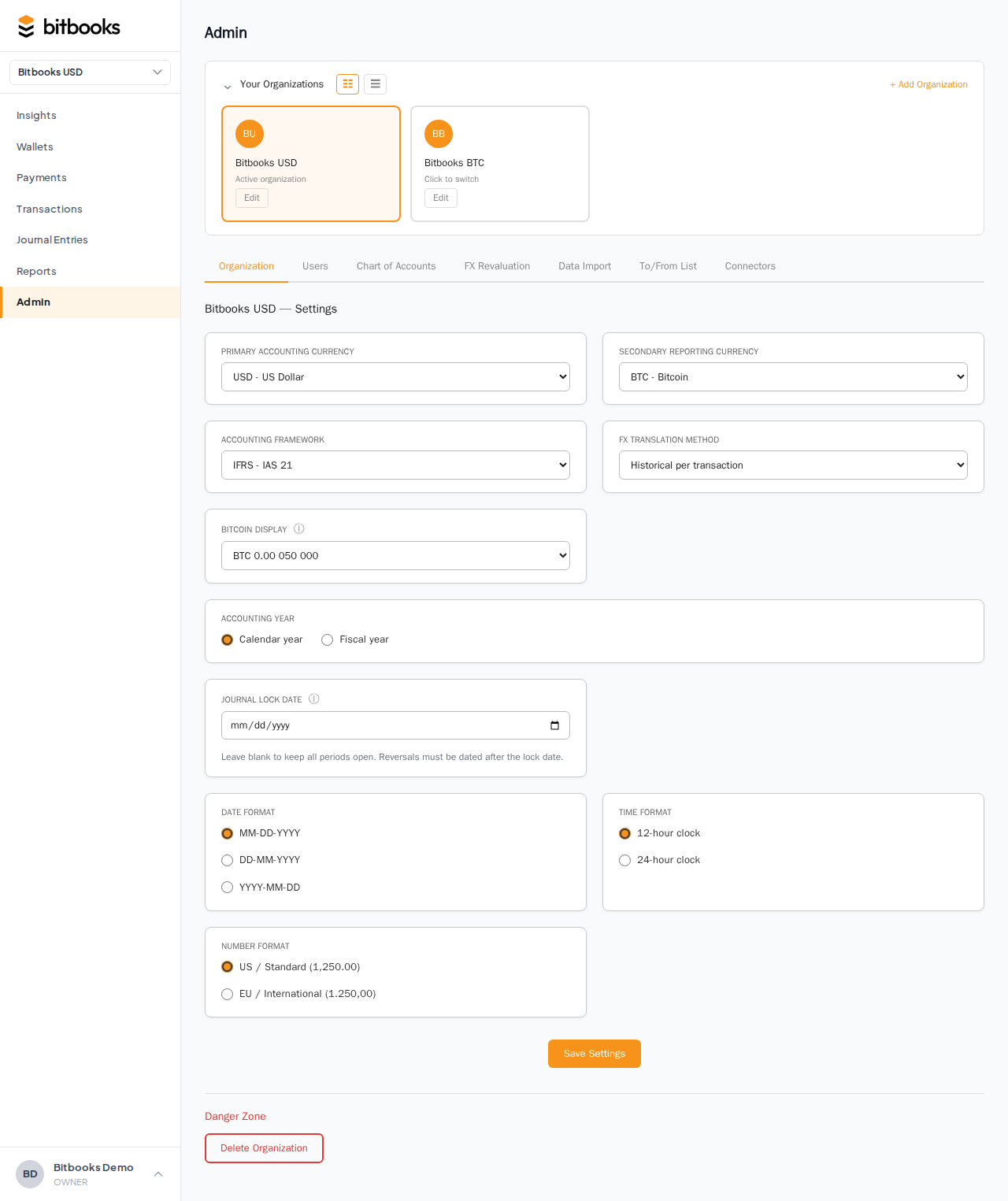
Steps:
- Click Admin in the sidebar
- Make sure you're on the Settings tab (it's the default)
- Scroll to Bitcoin display
- Pick one of the four modes from the dropdown
- Scroll to the bottom and click Save
The change applies immediately. Reload any open BitBooks tabs to see amounts re-rendered in the new format.
Per-organization, not per-user
This setting belongs to the organization, not to you personally. That means:
- Everyone on your team sees Bitcoin amounts the same way (good for consistency)
- If you manage multiple organizations (e.g., a bookkeeper with several clients), each one can have its own setting
- Switch organization in the sidebar dropdown, and the display mode switches with it
If your team is split, say the founder thinks in BTC and the developer thinks in sats, you'll have to pick one. Most teams default to BTC Consequence for reports and rely on each person doing the mental conversion. The integers-only nature of sats makes it tempting, but BTC is what most accountants and tax preparers expect to see.
What this setting does not affect
A few things that don't change when you flip the display mode:
- The actual amounts in your database. BitBooks always stores Bitcoin amounts in satoshis internally (as integers, for accuracy). The display mode only changes how those amounts are shown on the screen and in exports.
- Fiat amounts. Dollars, euros, pounds, etc. are formatted by the Number format setting (US Standard 1,234.56 vs European 1.234,56), not by the BTC mode.
- Reports for non-Bitcoin organizations. If your organization is set to USD-functional and you don't hold any BTC, the display mode setting effectively doesn't matter (there's no BTC to display).
A quick decision guide
Pick Satoshis if:
- Your team is mostly Lightning-focused
- Most of your transactions are small (under 100,000 sats)
- You hate decimal points
Pick Bitcoins if:
- You're moving whole or half BTC routinely
- You explain transactions to non-technical people often
- You want the cleanest possible appearance
Pick BTC Consequence if:
- You're not sure
- You produce reports that go to accountants
- You want full precision visible without squinting
Pick BTC High Precision if:
- Your accountant requires standardized 8-decimal format
- You're exporting to a system that expects rigid formatting
A practical tip
If you're unsure, start with BTC Consequence. It's the default for a reason. Most teams find it the right balance of precise and readable. You can always change it later, and the change is reversible (the underlying amounts don't change, just how they're shown).
Where to go next
- For the broader picture of how BitBooks handles Bitcoin, see How Exchange Rates Work
- For tracking value changes on your Bitcoin holdings over time, see Tracking Bitcoin Gains and Losses
- For other formatting settings (date format, time format, number format), see Organization Settings