The short answer
Every entry in BitBooks (whether it's a transaction or a journal entry) lives in one of four states:
| Status | What it means | Can you change it? |
|---|---|---|
| Draft | Started but not finalized, like writing in pencil | Yes, freely |
| Posted | Finalized, like writing in pen | No (you reverse, you don't edit) |
| Approved | Posted and approved by an authorized user | No |
| Reversed | Was posted, then undone with a reversing entry | No (the reversal is permanent too) |
The most important distinction is Draft vs Posted. The other two are variations of Posted.
Why this matters (the "why" first)
Imagine you're keeping the books for a coffee shop. On Monday you start typing in the weekend's sales. Coffee, pastries, tips. You get to one sale and realize you don't remember whether the customer paid in cash or by card. You leave the entry half-finished and go check the receipt drawer.
Now: should that half-finished sale show up in the books?
If yes, your Monday morning P&L includes a sale you haven't actually verified. Your balance is off. Your accountant sees a number that isn't real.
If no, you're free to leave it incomplete, fix it later, and only commit it to the books once you're sure.
That's what Draft means. Drafts are work in progress, hidden from your real numbers. They sit in BitBooks waiting for you to finish them, but they don't affect your reports until you say so.
Posted is the opposite. Posted means you've reviewed it, you're sure, and it's part of the permanent record. Once posted, an entry becomes part of your real books. It's included in every report, the basis for tax filings, the source of truth.
Different rules for different stages of certainty. That's the whole idea.
What each status looks like
Draft
You see Drafts everywhere, on the Transactions page, on the Journal Entries page, in lists. They're marked with a Draft badge.
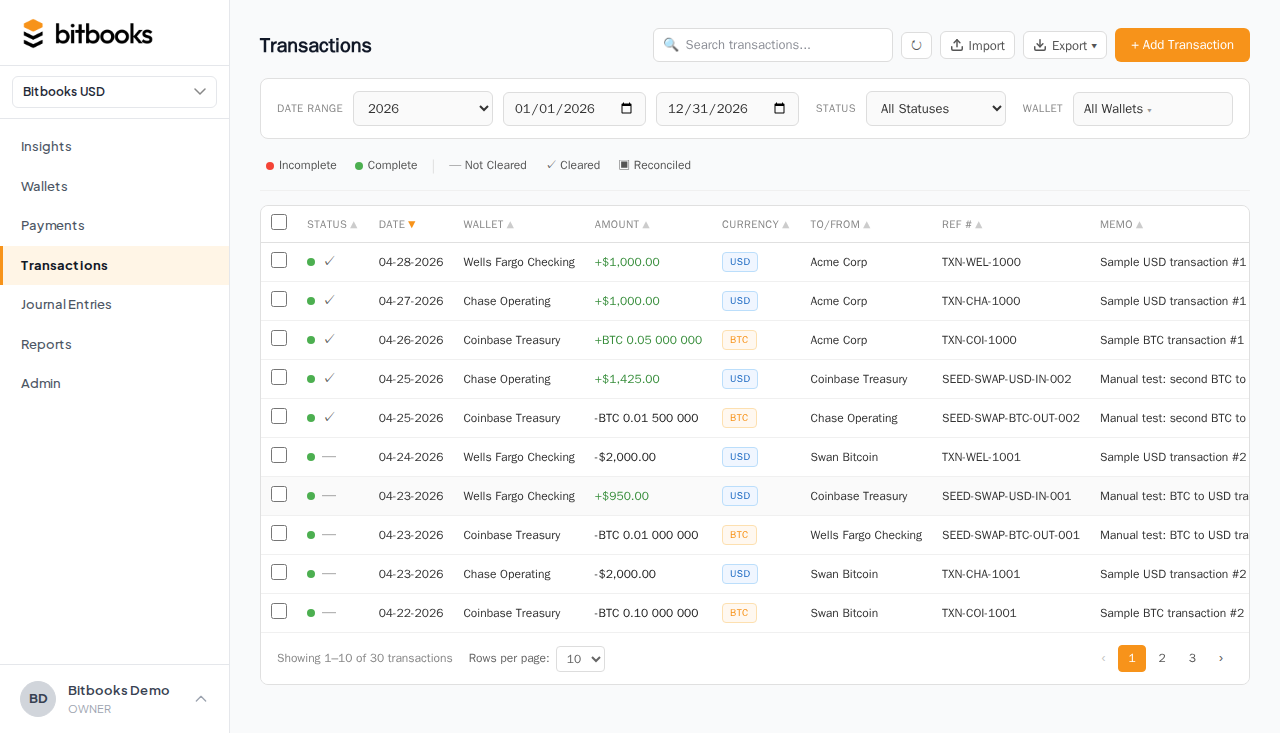
What's true about a Draft:
- It's saved (you can leave the page and come back to it)
- It's invisible to your reports (P&L, Balance Sheet, Trial Balance, none of them include Drafts)
- It can be edited freely. Change any field, update the amount, add a memo, switch the wallet
- It can be deleted. If you decide it's not real, just delete it
When entries land as Drafts:
- Auto-imports from Bitcoin Connections start as Drafts. You review, then post.
- Bulk imports from CSV or QuickBooks start as Drafts.
- Anything you create with "Save and continue" instead of "Save and post" stays as a Draft.
Posted
A Posted entry has been committed to the books.
What's true about a Posted entry:
- It shows up on every relevant report
- It can't be edited (the values are now permanent)
- It can't be deleted (you'd lose the audit trail)
- It can be reversed, which creates a new, opposite entry that cancels out the original. Both stay in the record.
What you can still change on a Posted entry, with limits:
- Memo: yes, you can update the memo (it's a note, not a number)
- Attachments: yes, you can attach a receipt after posting
- Contact: yes, you can re-link to a different vendor or customer (the system tracks this in the audit log)
- Amount, date, accounts, currencies: no. Those are the actual accounting values. To change them, you reverse the original and post a new entry.
Approved
Some organizations require a second person to approve an entry after it's posted. This is common for:
- Large amounts
- Sensitive accounts (e.g., owner draws, salary)
- Operations where one person enters and another reviews
If your organization uses approvals, you'll see an Approve action on Posted entries. After someone approves, the status changes from Posted to Approved. From a numbers perspective, Approved is the same as Posted. Both are part of the books. The difference is the paper trail showing two people signed off.
Reversed
When you reverse a Posted entry, BitBooks creates a second, opposite entry that cancels out the first. Both entries stay visible.
Why both? Because the audit trail matters. If you just deleted the original, anyone reading the books later (your accountant, an auditor, the IRS) wouldn't know it had ever existed. With a reversal, the original is preserved, and the reversal makes it clear what happened: "This was wrong, and here's the correction."
After a reversal, the original entry's status flips to Reversed, and the new entry shows a link back to it.
A real example
Here's how a typical entry flows through these states:
Monday, 9 AM The Blink connector imports yesterday's sales. Six new transactions land in your Transactions page, all marked Draft.
Monday, 9:15 AM You open the first one. The amount is right (12,500 sats received from a customer). The date is right. But the contact is blank. Blink doesn't know who paid you. You set the contact to "Cash Customer" (a generic catch-all). You set the category to "Sales, Coffee."
You click Save and post. Status: Posted. The 12,500 sats now show up in your P&L for Monday under Sales.
Monday, 9:20 AM Same thing for the next five transactions.
Tuesday, 2 PM You realize one of yesterday's posts had the wrong amount. You had categorized a 50,000-sat tip as a sale when it was actually a tip (a different account). The Posted entry is locked. So you click Reverse.
BitBooks creates a reversing entry that cancels out the original. The original's status changes to Reversed. You then create a new entry with the right account ("Tips Received") and post that. Result: your books are now correct, and there's a permanent trail showing what happened.
When you'd use each status deliberately
Save as Draft when:
- You're not sure about a detail (the contact, the category, the amount)
- You're entering a batch of transactions and want to review them all before committing
- You're handing the entries to a bookkeeper for review
- You want to attach a receipt before posting
Post immediately when:
- The entry is straightforward and you've reviewed it
- It's coming from a trusted source (an auto-sync, a CSV import you've already validated)
- You're ready for it to show up on reports
Reverse instead of editing when:
- You discover a Posted entry was wrong
- The original was already used in a report you sent out (so you need a paper trail of the correction)
How posting works in BitBooks
You'll see these options on most save buttons:
- Save: saves as Draft (or whatever the current status is)
- Save and post: saves and immediately posts
- Save and new: saves and clears the form for the next entry
You can also post several Drafts at once. On the Transactions or Journal Entries page, tick the rows you want, then click Bulk Post. Useful at month-end when you have a stack of imports to commit.
Common confusions, cleared up
"If a Draft doesn't show on my reports, why does it exist?"
So you can prepare entries before they're real. Without Drafts, every entry would either be live immediately (which means typos and half-finished entries pollute your books) or live nowhere (which means you can't save your work). Drafts give you a safe staging area.
"Can I edit a Posted entry's amount if I notice a typo right after posting?"
No, even if it was 5 seconds ago. The whole point of "Posted" is that the amount stops being changeable. Reverse it and re-post with the correct amount.
"What if my whole month was wrong? Do I have to reverse 200 entries?"
Practically, no. That's painful. Talk to your accountant and to support. Often the right move is to make a smaller number of correcting entries that net to the right total. That's how a real-world accountant fixes a category-wide mistake.
"Why can't I delete Posted entries?"
Because the books are supposed to be permanent. If you could delete entries, anyone could "fix" history by erasing inconvenient ones. The reversal pattern is a stronger compromise. You can correct anything, but the original always stays visible.
Where to go next
- See Creating a Transaction for how to make new entries
- See Bulk Posting Drafts for the month-end cleanup workflow
- See Reversing a Posted Entry for the full reversal procedure
- See Period Close for how to lock everything before tax time