When you'd export
Reports inside BitBooks are useful, but most stakeholders want a file:
- Your accountant wants a P&L Excel for analysis or tax prep
- Your investors want a PDF Balance Sheet for their records
- Your bank wants 3 years of financial statements as PDFs for a loan application
- Your board wants a polished PDF deck of the quarter's reports
- You want to archive reports outside the live system
Every report in BitBooks supports export.
How to export
On any report page (P&L, Balance Sheet, Trial Balance, General Ledger, Cash Flow, Activity Log):
- Set the date range and any filters you want
- Click Export at the top
- Pick PDF or Excel
- The file downloads to your computer
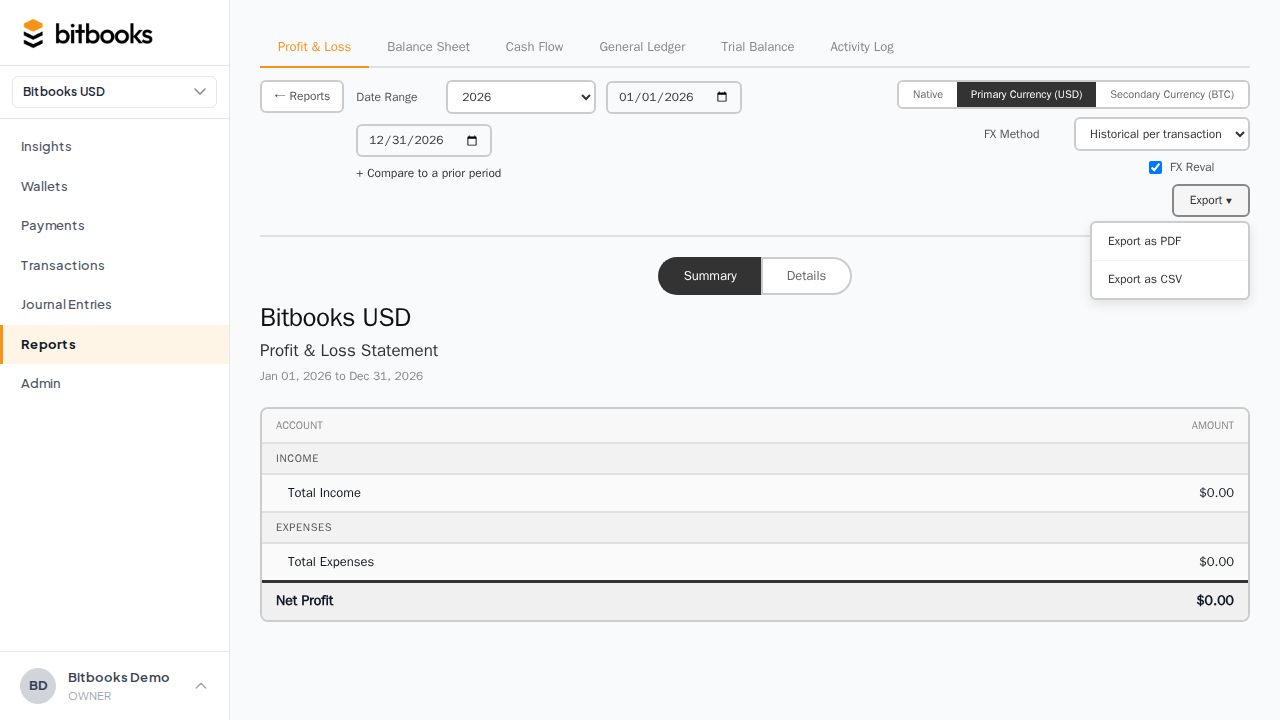
The export uses whatever you currently see on screen. If you've applied filters or toggled to a different currency view, the export reflects that.
PDF format
PDFs are formatted for reading and printing:
- BitBooks branding at the top (your organization name, the report name, the period)
- Clean tabular layout
- Page breaks at logical sections
- Color-coded for clarity (e.g., debits blue, credits orange)
- Footer with the export date and the user who exported
Use PDF for:
- Sharing with people who don't need to manipulate the data (investors, banks, the board)
- Long-term archives
- Printing
Most reports are 2-10 pages depending on the period. The General Ledger for a full year can be 100+ pages.
Excel format
Excel files (.xlsx) are formatted for analysis:
- Each report section is a separate sheet
- Headers are formatted as headers (frozen pane, bold)
- Numbers are stored as numbers (not text), so you can sum, pivot, formulate
- Formulas (where applicable) are preserved for verification
- Account codes and names are separate columns for sorting
Use Excel for:
- Sharing with your accountant who wants to analyze
- Building a budget vs actuals tracker
- Pivot table analysis
- Re-formatting for an internal template
The General Ledger Excel is especially useful: every transaction is a row with separate columns. You can filter and pivot like a database.
What gets included
Each report includes the same content as on screen:
- P&L: revenue, expenses, gross/net profit, with comparison columns if you set them
- Balance Sheet: assets, liabilities, equity, with as-of date
- Trial Balance: all accounts with their debit/credit balances
- General Ledger: every transaction in every account
- Cash Flow: the three sections plus summary
- Activity Log: every action with user, timestamp, action, entity, diff
If you applied a date filter, the export covers that date range. If you toggled currency, the export uses that currency.
Branding and customization
Today, exports use a standard BitBooks template (your organization name, the report name, the date). Custom branding (your logo, your color scheme, your footer text) is on the roadmap.
For now, if you need custom-branded reports, the workflow is: export to Excel, paste into your branded template, save as PDF. A few extra minutes per report.
Multi-currency exports
If your organization has a reporting currency, exports can be in either functional or reporting currency.
To export in reporting currency: toggle the report to reporting currency view, then Export. The exported file uses the currency you saw.
Same for functional currency.
If you want both: export each separately.
File sizes
Typical sizes:
- P&L PDF for one month: ~50 KB
- Balance Sheet PDF: ~50 KB
- Trial Balance PDF: ~100 KB
- General Ledger PDF for a quarter: ~500 KB to 5 MB
- General Ledger Excel for a year: ~1-10 MB
- Activity Log Excel for a year: ~5-20 MB depending on activity volume
Most files email-attach fine. Very large GL exports might need a file-share link.
Performance
For most reports, export is near-instant (a few seconds). For very large exports (multi-year GL with thousands of transactions), it can take 10-30 seconds. The page shows a progress indicator.
If an export hangs for more than a minute, that's an issue worth reporting to support.
Common questions
"Can I email a report directly from BitBooks?"
Not yet. Today: export, attach to your email yourself. In-app email-a-report is on the roadmap.
"Can I schedule recurring exports (e.g., monthly P&L emailed automatically)?"
Not yet. Roadmap.
"Can I export to Google Sheets?"
Not directly. Excel files import into Google Sheets cleanly: download Excel, then upload to Drive and convert.
"Can I export multiple reports at once (a 'monthly close package')?"
Not yet as one bundle. Today: export each report separately. Roadmap.
"Why is my exported PDF different from what I see on screen?"
It shouldn't be. Check that the date range and filters match. If they're identical and the export still differs, that's a bug worth reporting.