Why invite people
BitBooks is multi-user from day one. The owner doesn't have to do everything. Common splits:
- Owner signs in occasionally to review and approve. Sees everything.
- Bookkeeper does daily entry, runs reconciliations, drafts reports. Lives in BitBooks.
- Accountant comes in monthly or at year-end to review, post adjustments, and produce financial statements.
- Viewer (an investor, a partner, a board member) can see reports but not change anything.
Each person gets their own account. They each sign in with their own email and password.
How to invite
- Click Admin in the sidebar
- Click the Users tab
- Click Invite User
- Fill in their email, pick their role, click Send Invite
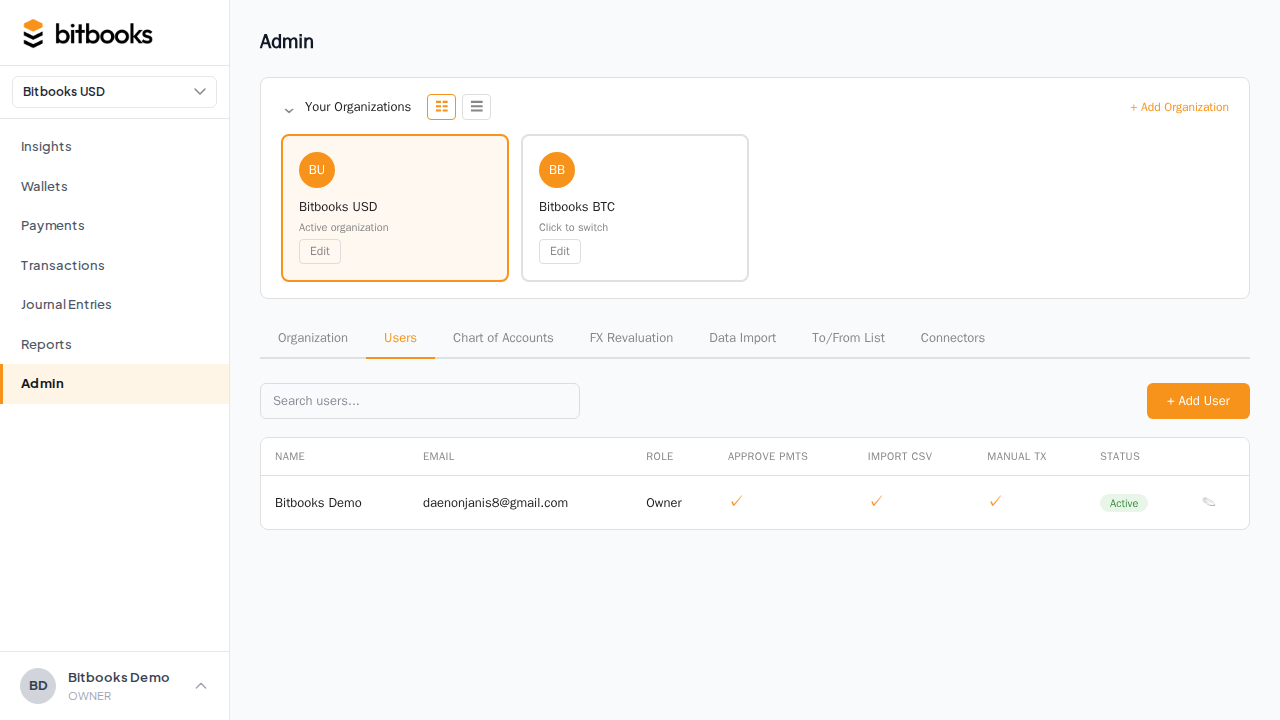
The invitee gets an email with a magic link. Clicking it sets up their account in their browser. They pick a password (or sign in with magic link only) and they're in.
If they don't see the email, check their spam folder. The sender is noreply@bitbooks.com.
The five roles
| Role | What they can do | Typical user |
|---|---|---|
| Owner | Everything. Can delete the org. There's only one owner. | Founder, CEO |
| Admin | Everything except deleting the org and changing the owner. | Co-founder, CFO |
| Accountant | Full read/write on books. Can post journal entries, run all reports, close periods. | External CPA, fractional CFO |
| Member | Day-to-day bookkeeping. Create and edit transactions. Cannot change settings, manage users, or close periods. | In-house bookkeeper |
| Viewer | Read-only. Can see reports and transactions but cannot change anything. | Investor, board member, partner |
If you're not sure, Member is the safe pick for a new bookkeeper. You can promote them later. Demote is harder than promote, so err on the side of less access.
What each role sees
All roles see the same screens and the same numbers. The difference is what's clickable.
A Viewer opening a transaction sees all the fields but can't edit. A Member opening Admin → Settings sees the page but most fields are disabled. The UI doesn't hide things, it just blocks the actions you don't have permission for.
Multiple organizations
If your invitee should access several organizations (say, your bookkeeper handles three of your client books), you invite them to each one separately. Each invitation is per-organization.
In their account, they'll see all the orgs they belong to in the sidebar's organization-switcher dropdown.
You can also bulk-invite: from the user creation flow, tick Add to all my current organizations to invite the same person across every org you own with one click.
Removing someone
- Admin → Users
- Click the user
- Click Remove
This removes their access immediately. Their historical actions stay in the audit log (so you can still see who did what), but they can no longer sign in or make changes.
If they were the contact on transactions, those transactions stay linked to their name in the audit trail. The data isn't lost.
Changing someone's role
Same place. Click the user, change their role, save. The change applies on their next page load.
Demoting someone in the middle of a workflow can interrupt them (e.g., they were typing a journal entry that requires Admin permissions). Tell them ahead of time when possible.
Two-factor authentication (recommended)
Strongly recommended for everyone with Admin or Accountant roles. See Two-Factor Authentication for setup.
The owner can require 2FA at the organization level so all members are forced to set it up before they can sign in.
Common questions
"Can I have a 'time-limited' user, like an auditor for two weeks?"
Not directly. The workaround: invite them with the role they need, then remove access when they're done. Their work stays in the audit log.
"What's the difference between 'Accountant' and 'Admin'?"
Admin can change organization settings (currencies, frameworks, etc.) and manage users. Accountant has full access to the books but can't reconfigure the organization or invite people. Most external accountants want Accountant, not Admin.
"Can a user belong to multiple organizations with different roles?"
Yes. They might be Owner in their own organization and Accountant in three client organizations. Each role is per-org.
"What happens if I delete a user who created transactions?"
The transactions stay. The audit log still shows their name. Future syncs and changes are attributed to the system.
Where to go next
- User Roles for the full role-by-role breakdown
- Two-Factor Authentication for hardening sign-in
- Multiple Organizations if you manage several
- Audit Log to see what each user has done