Where settings live
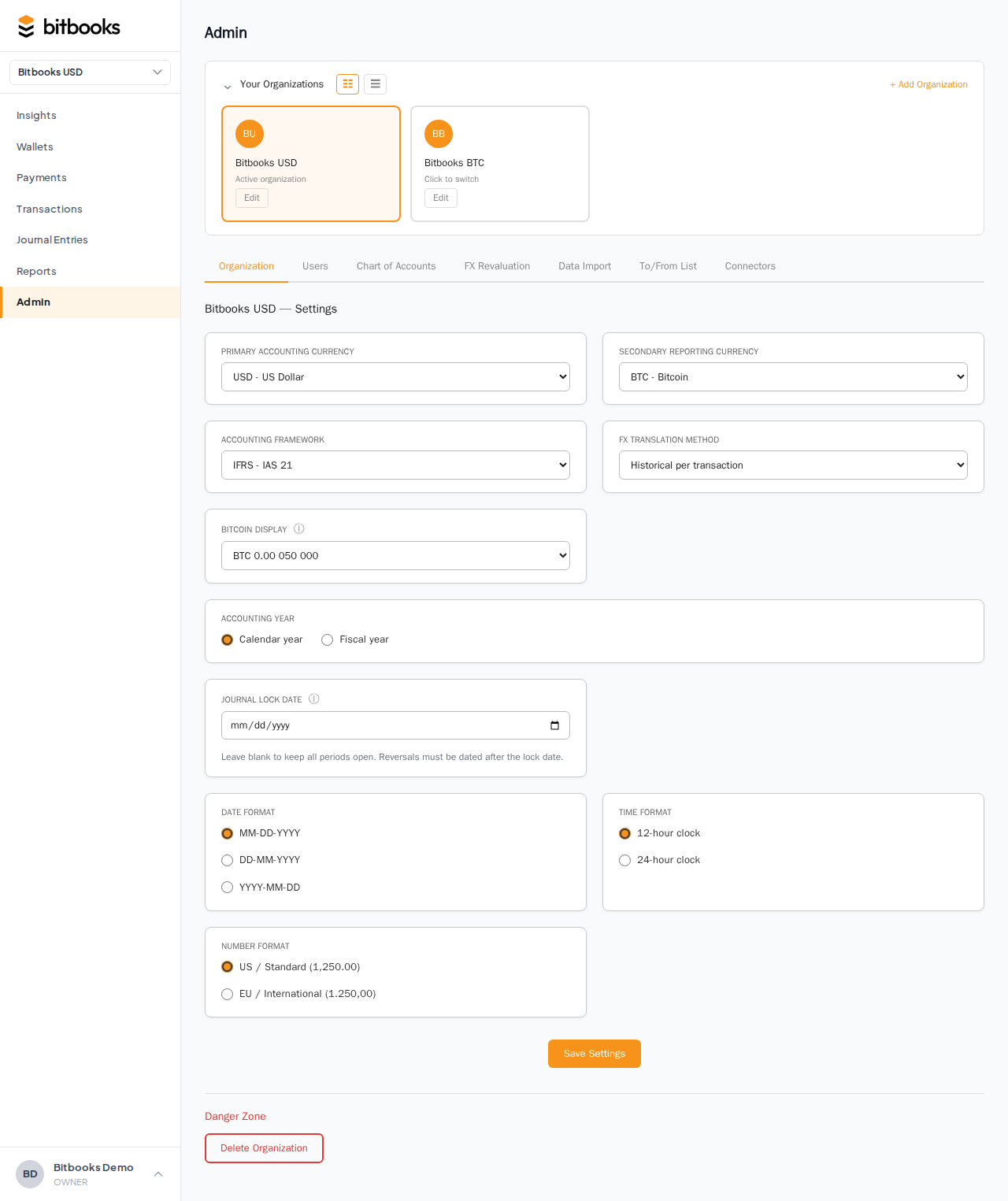
All organization-level settings are at Admin → Settings. The page is a long form grouped by topic. Click Save at the bottom when you're done.
You need Admin or Owner role to change settings. Members and Viewers see the page but can't modify.
What's on the page
Currency
- Primary accounting currency. Your functional currency. The main currency your books are kept in. See Setting Your Functional Currency.
- Functional currency type. FIAT or BITCOIN. Determines whether your functional currency is BTC or a fiat code.
- Secondary reporting currency. Optional second currency that shows alongside the functional one on reports. See Setting Your Reporting Currency.
- Primary exchange provider and Secondary exchange provider. Where exchange rates come from. Default is Open Exchange Rates for fiat and CoinGecko for BTC. Most users keep defaults.
Accounting
- Accounting framework. IFRS, US GAAP, or both. Affects how some calculations are presented. See Setting Up Your First Organization for the framework choice.
- FX translation method. Historical per Transaction (default), Closing Rate, or Period Average. Controls how multi-currency reports are translated. See How Currency Conversion Works.
- Accounting year type. Calendar year (Jan-Dec) or Fiscal (any 12 months).
- Fiscal year start month / end month. Only used if Accounting year type = Fiscal.
- Journal lock date. The date that closes everything before it. See Period Close.
Bitcoin
- Bitcoin display preference. BTC High Precision, BTC Consequence, Bitcoins, or Satoshis. See BTC Display Modes.
Localization
- Number format. US Standard (1,234.56) or European (1.234,56).
- Date format. MDY (US), DMY (most of world), or YMD (ISO).
- Time format. 12-hour or 24-hour.
- Time zone. IANA time zone for the organization (e.g., America/New_York).
Approvals
- Approval threshold currency. A specific currency for the threshold amount.
- Approval threshold amount. Transactions at or above this amount require approval. See Setting Spending Limits per Wallet.
Organization metadata
- Organization name. What this org is called.
- Slug. A URL-friendly version of the name (used in some routes). Auto-generated from the name; you can override.
Danger zone
- Archive organization. Soft-delete the org (you can restore later).
- Delete organization. Permanent delete. Wipes all data. Use only if you're absolutely sure.
Saving changes
Most changes apply immediately when you click Save:
- Currency display changes apply to your next page load
- Localization changes apply immediately
- Approval threshold changes apply to future transactions
A few changes are special:
- Functional currency change. Requires an audit reason and an effective date. The change is logged and visible in reports. See Changing Your Functional Currency After Going Live.
- Lock date change. Standard save, but the change is logged in the Activity Log. Anyone reviewing knows when periods were closed.
Settings vs preferences
Organization settings affect everyone in the organization.
- Change BTC display preference: every team member now sees BTC the new way.
- Change date format: everyone sees dates the new way.
- Change functional currency: the books are now in the new currency for everyone.
There's no per-user preference for any of these. The whole team operates on a consistent view.
If a team member personally prefers a different display (e.g., the developer wants sats, the founder wants BTC): pick one as the org standard. Personal preferences will have to bend to the organization choice for now.
Common questions
"Can I have different settings for different organizations?"
Yes, and you should. Each organization has its own settings, completely independent. A USD-functional org and a CAD-functional org operate side by side under the same user account.
"What if I'm not sure what to pick?"
Defaults are sensible:
- Functional currency: pick your home country's currency
- Framework: IFRS
- Accounting year: Calendar
- BTC display: BTC Consequence
- Number format: US Standard if you're in the US, European otherwise
- Date format: matches your country (MDY for US, DMY for most others)
You can change later. Better to pick something reasonable than agonize.
"I'm a Member role; why can't I change settings?"
Member is the day-to-day bookkeeping role. Settings are governance-level decisions that affect everyone. They're restricted to Admin and Owner. If you need a setting changed, ask an admin.
"Where do user-level preferences (like notification subscriptions) live?"
In your user profile, separate from organization settings. Click your avatar in the sidebar → Profile.
Where to go next
- Setting Up Your First Organization for the initial configuration
- User Roles for who can change settings
- Setting Your Functional Currency for the most-impactful setting
- Period Close for the lock date
- Multiple Organizations for managing several orgs at once