What "closing a period" means
When a month (or quarter, or year) ends, you go through your books, make sure everything is right, then close that period. Closing means:
- All entries for the period are reviewed and finalized
- The Trial Balance is verified
- Reconciliations are complete
- A snapshot of the financials is preserved
- Nobody can create, modify, or delete entries dated in that period anymore
That last point is the whole reason period close exists.
Why locking matters
Imagine your accountant closed January on February 5th and sent the January P&L to your investors. Two weeks later, an employee enters a new expense by accident with a January date. Without period locking, that expense would silently flow into January's numbers. The P&L you sent your investors is now wrong. Nobody knows.
With period locking:
- The new expense gets rejected before it lands
- The employee gets an error: "January is closed. You cannot create entries before February 1."
- The employee fixes the typo (changes the date to February), the entry posts correctly
- January stays exactly as it was when you sent it to investors
That's the value of locking. Once a period is closed, the numbers from that period are stable forever. Reports you've already shared stay accurate.
When to close a period
The standard cadence:
- End of each month: close the month after reconciling all wallets
- End of each quarter: for businesses that report quarterly
- End of each year: mandatory before tax filing
Some businesses close every month. Some only close at year-end. Pick what works.
A reasonable monthly close runs through this checklist:
- All transactions for the month are entered (no pending Drafts left)
- All wallets are reconciled
- Trial Balance is balanced (debits = credits)
- P&L looks reasonable (no obvious errors)
- Any month-end adjustments are entered (depreciation, accruals, FX revaluations)
- THEN close
If you skip step 1-5 and close anyway, you'll discover errors later and have to reopen the period to fix them. Cheaper to do the checklist first.
How to close a period in BitBooks
BitBooks closes periods using a single setting called the Journal Lock Date. Any date on or before this date is locked.
To close
- Go to Admin → Settings
- Find Journal Lock Date
- Set it to the last day of the period you want to close (e.g., 2026-01-31 to close January)
- Click Save
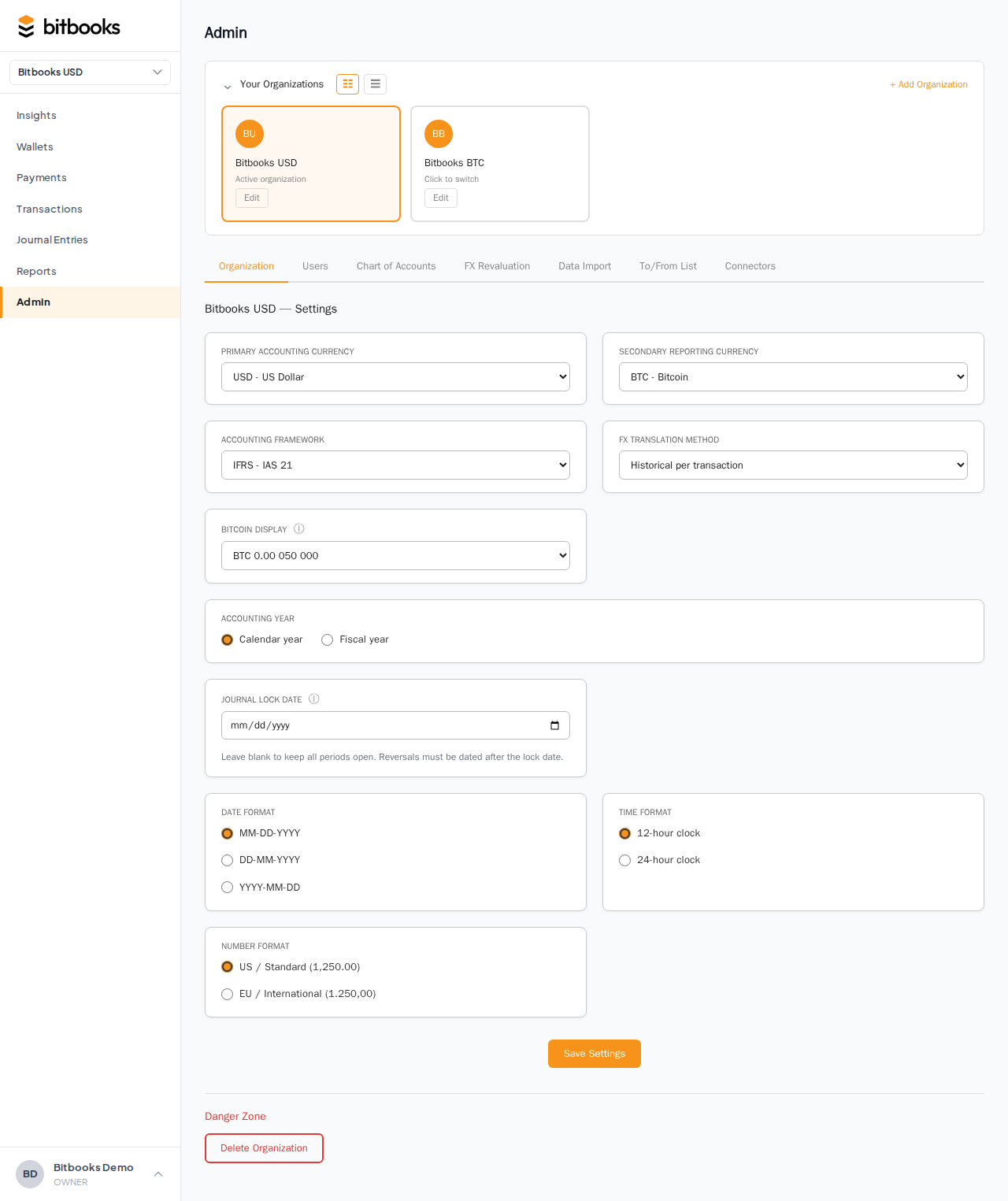
That's it. Everything dated 2026-01-31 or earlier is now locked. Trying to create or edit any entry dated within that range produces an error.
To extend the lock (close the next month)
When February ends, you reconcile, do the month-end adjustments, then change the Lock Date to 2026-02-28. February is now locked along with everything before it.
The Lock Date moves forward over time. It never goes backwards in normal operation.
What "locked" actually prevents
Once a date range is locked:
- ❌ Creating new transactions or journal entries dated in the locked range
- ❌ Editing the amounts, dates, accounts, or currencies of locked entries
- ❌ Deleting locked entries
- ❌ Reversing locked entries (creates a new entry dated today, not in the past)
What you CAN still do:
- ✅ View locked entries
- ✅ Run reports for locked periods (they're stable, won't change)
- ✅ Update memos and attachments on locked entries (those don't affect numbers)
- ✅ Create new entries dated after the lock date
What if I really need to fix something in a locked period?
This is the "I closed January, but on February 20th I realized a January entry was wrong" scenario. Three options:
Option 1: Make a correcting entry in the current period (recommended)
Don't reopen January. Instead, create a new entry dated today that corrects the wrong number.
For example, if January's "Office Supplies" was overstated by $200, post a journal entry today:
| Account | Debit | Credit |
|---|---|---|
| Office Supplies | $200 | |
| Some balancing account (often "Prior Period Adjustment") | $200 |
This is the standard accountant move. The original mistake stays in January (preserving what was reported), and the correction lands in the current period (where it can affect this month's P&L without rewriting history).
Option 2: Reverse and re-post (also fine)
Same as Option 1 but using BitBooks' Reverse function on the original entry. The reversal creates a new entry dated today (not in the past), exactly cancelling the original. Then you post a new correct entry, also today.
Option 3: Reopen the period
Lift the lock by setting the Journal Lock Date to a date earlier than January. Now January is unlocked, you can edit. Then re-set the lock to January 31.
This rewrites history. Anyone who already saw January's reports might now see different numbers. Use sparingly, only for genuine errors that need to land in their original period (rare).
For most purposes, Option 1 or 2 is the right answer.
Year-end close
The annual close is more involved than a monthly close. In addition to the monthly checklist, year-end usually includes:
- FX revaluation of any Bitcoin and foreign currency holdings (booking unrealized gains/losses), see Tracking Bitcoin Value Changes
- Closing entries that roll the year's net profit into Retained Earnings
- Depreciation for any owned assets
- Tax provisions if you accrue for income tax
- Inventory adjustments if you hold inventory
After all of these are entered, set the Journal Lock Date to December 31. Now the year is closed.
The next year's Profit & Loss starts from zero (P&L accounts always reset at year-end). The Balance Sheet carries forward (assets, liabilities, equity persist).
What you can NOT do in BitBooks (yet)
A few things that don't exist in V2 but might in future versions:
- Multiple lock dates (one for accountants, one for everyone else)
- Per-user override ("Only the controller can post into a closed period")
- Soft locks (warnings instead of hard errors)
For now, the Lock Date is a single setting that applies to everyone. If you need a small bookkeeper to be able to enter into a closed period while everyone else is blocked, the workaround is: temporarily reopen, the bookkeeper enters, you re-lock. Mildly inconvenient, but workable.
Common questions
"I tried to enter a transaction dated last month but got an error."
The Lock Date is set to a date that includes the date you're trying to use. Either:
- Change the transaction's date to today (if the entry actually belongs in the current period)
- Reopen the period if the entry truly belongs in the locked period (and you accept rewriting history)
- Make a correcting entry in the current period instead (Option 1 above)
"My Insights page numbers changed after I closed the period. Why?"
Closing the period shouldn't change historical numbers. If you see a change, something else is happening: maybe you ran an FX revaluation that re-stated Bitcoin values, or a transaction was edited before the lock date was set. Run the Trial Balance and Activity Log reports to investigate.
"What's the difference between 'closing' and 'archiving' an organization?"
Closing locks the books for a period; the organization stays open and active. Archiving an organization removes it from your active list (you can still access historical data). Different actions, different intents.
Where to go next
- Trial Balance for verifying the books before closing
- Reconciliation for matching wallets before closing
- Tracking Bitcoin Value Changes for year-end Bitcoin revaluation
- Reopening a Closed Period for the formal unlock procedure
- Reversing a Posted Entry for the in-period correction flow