What this is
You moved fiat (USD, EUR, CAD, etc.) out of one of your accounts to acquire Bitcoin. The Bitcoin landed in one of your wallets. This is a Bitcoin purchase.
Examples:
- You bought 0.1 BTC on Coinbase using $9,000 USD from your Coinbase USD balance
- You sent $5,000 from your bank account to River Financial and they delivered BTC to your hardware wallet
- You used Strike to convert $200 USD to sats and the sats landed in your Strike wallet
The accounting question: how do you record this in BitBooks so the books are correct?
The clean answer: a Transfer
A Bitcoin purchase is conceptually a transfer between two of your wallets:
- Money out of the fiat wallet (the USD account)
- Money in to the Bitcoin wallet (the BTC wallet)
The exchange rate is locked in by the actual prices at the time of purchase.
In BitBooks:
- Transactions → New Transaction
- Mode: Transfer
- From wallet: your fiat wallet (e.g., "Coinbase USD")
- From amount: the dollar amount you sent (e.g., $9,000)
- To wallet: your Bitcoin wallet (e.g., "Coinbase BTC" or "Trezor Cold")
- To amount: the BTC amount you received (e.g., 0.1 BTC)
- Date: when the purchase happened
- Memo: useful context, like "Coinbase market buy" or "DCA buy via Strike"
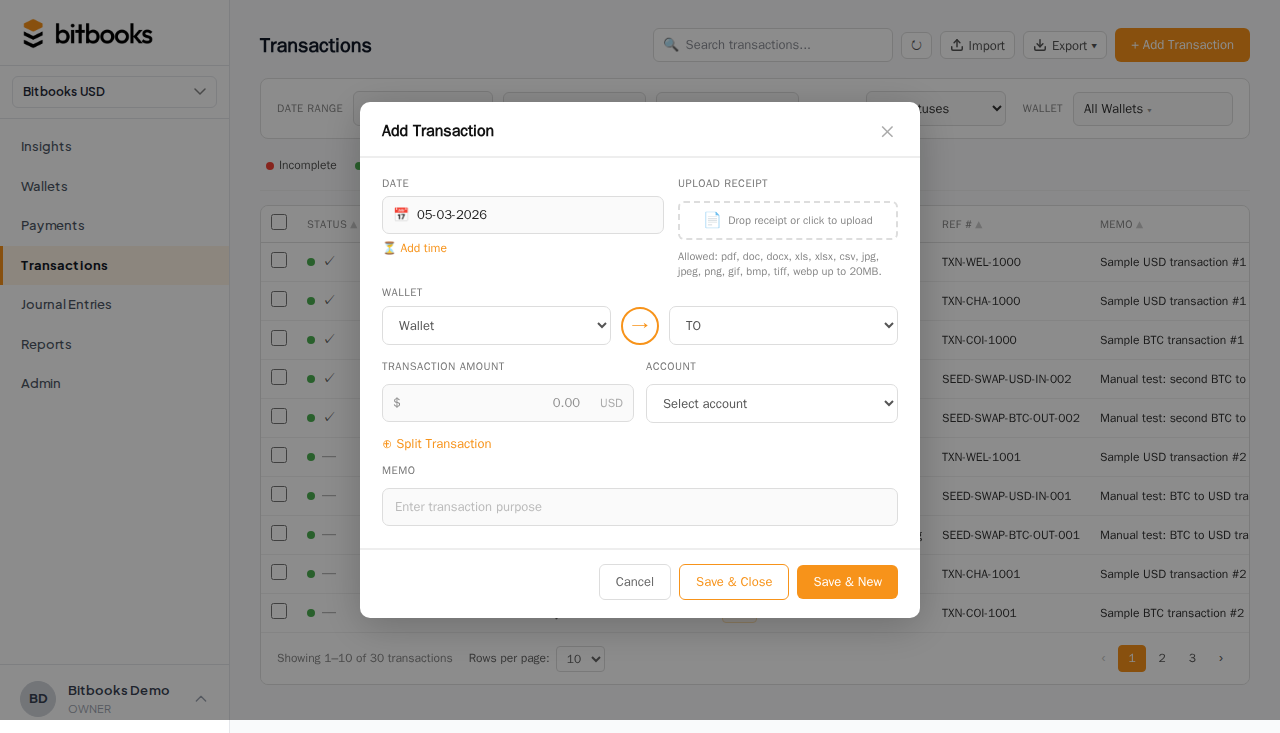
Save and post.
Why this is a Transfer, not a Sale
Some new users want to record this as "sales income" because dollars came in to their BTC wallet. That's wrong. You didn't earn dollars. You owned dollars and now you own Bitcoin.
In accounting terms:
- Sales = revenue from operations (selling a product or service)
- Purchase of Bitcoin = a swap of one asset for another. Revenue is unchanged.
Recording it as a transfer keeps your P&L accurate. Your revenue line shows what your business earned, not what you reorganized between your own accounts.
What about the exchange rate?
The exchange rate is implied by the From and To amounts:
- $9,000 / 0.1 BTC = $90,000 per BTC
BitBooks records this rate as the cost basis for the Bitcoin you just acquired. It's stored permanently with the transaction. When you eventually sell or revalue the Bitcoin, this is the rate used to compute gains and losses.
If the exchange rate matters to your accounting (it almost always does for tax purposes), use the actual exchange rate at the time of the trade, not the market rate. Exchanges add spreads and fees. Your real cost is what you paid, not what BTC was on CoinGecko.
What about exchange fees?
Most exchanges charge a fee. Two ways to handle it:
Option A: Bake the fee into the rate
If Coinbase charged you $9,000 to receive 0.0995 BTC (0.0005 BTC less due to fees), record:
- From: $9,000
- To: 0.0995 BTC
The fee is implicit in the higher effective rate ($90,452 per BTC instead of $90,000). Your books are correct, but the fee isn't itemized.
Option B: Show the fee separately
If you want the fee as its own line:
- Use Advanced Mode (Journal Entries) instead of Simple Mode
- Three lines: debit BTC wallet (the actual amount received), debit Exchange Fees (the fee amount), credit USD wallet (the total paid)
This gives you visibility into how much exchange fees cost over time. Worth it if you trade often.
For occasional buyers, Option A is fine.
Common scenarios
Buying via your bank to a custodial wallet
Money out of your bank, BTC into Coinbase. Two-step in real life (the bank wire, then the Coinbase trade) but you can record as a single transfer if both happened on the same day.
If they happened on different days (wire on Monday, trade on Tuesday), record them separately:
- Monday: Transfer from bank to "Coinbase USD" (your USD balance at Coinbase)
- Tuesday: Transfer from "Coinbase USD" to "Coinbase BTC"
Two wallets at Coinbase: one for USD, one for BTC. They're separate balances.
Dollar-cost averaging (DCA)
You buy a small amount every week. Each one is its own transfer. They all stack as separate transactions, each with its own rate.
For tax accounting, this gives you the granular cost basis BitBooks needs to compute gains and losses correctly when you eventually sell.
Buying with stablecoin
If you trade USDC for BTC: same Transfer pattern, but the From wallet is your USDC balance (also tracked in BitBooks as a wallet).
What if my wallet auto-syncs?
Many providers (Coinbase, Strike, etc.) auto-import the trade as two transactions: one debit to USD, one credit to BTC. They show up in BitBooks as a pair of Drafts.
Two ways to handle:
-
Use the auto-imported pair as-is. Post both. They each touch one side of the trade. Make sure they have the same date and memo so they group naturally.
-
Replace with a Transfer. Delete the two Drafts. Create one Transfer transaction. Cleaner record, less clutter.
We recommend option 2 for clarity, but either works.
On gain/loss
A Bitcoin purchase doesn't create gain or loss. You traded $9,000 worth of dollars for $9,000 worth of Bitcoin. The Bitcoin's value will fluctuate from here, but at the moment of purchase, gain = 0.
Gains/losses appear later when:
- You sell the Bitcoin (realized gain/loss)
- You revalue the Bitcoin to current market price (unrealized gain/loss)
See Recording a Bitcoin Sale and Tracking Bitcoin Value Changes.
Where to go next
- Recording a Bitcoin Sale for the inverse transaction
- Recording a Wallet-to-Wallet Transfer for the general transfer pattern
- Tracking Bitcoin Value Changes for FX revaluation accounting
- The 10 Transaction Templates for shortcuts to common Bitcoin transactions