What this looks like
A customer paid you using Lightning. Sats arrived in your Lightning wallet (Blink, Phoenix, Strike, etc.). You need to record it as revenue.
Three ways this happens:
- Auto-import via Bitcoin Connections. Your wallet provider syncs to BitBooks, the receive shows up as a Draft, you review and post.
- You enter it manually because you haven't connected the wallet, or because you're recording an off-platform Lightning payment.
- A pair of imported entries that you need to merge or simplify.
If auto-sync caught it
The simplest case. The Draft is sitting in your Transactions page waiting for review.
Open it:
- Confirm the amount (5,000 sats, 12,500 sats, whatever)
- Confirm the date is correct
- Set the contact (the customer who paid)
- Set the category (Sales: Coffee, Service Revenue, Tips Received, depending on what the payment was for)
- Optional memo (invoice number, what they bought)
- Click Save and post
Done. The Lightning payment is now revenue on your books.
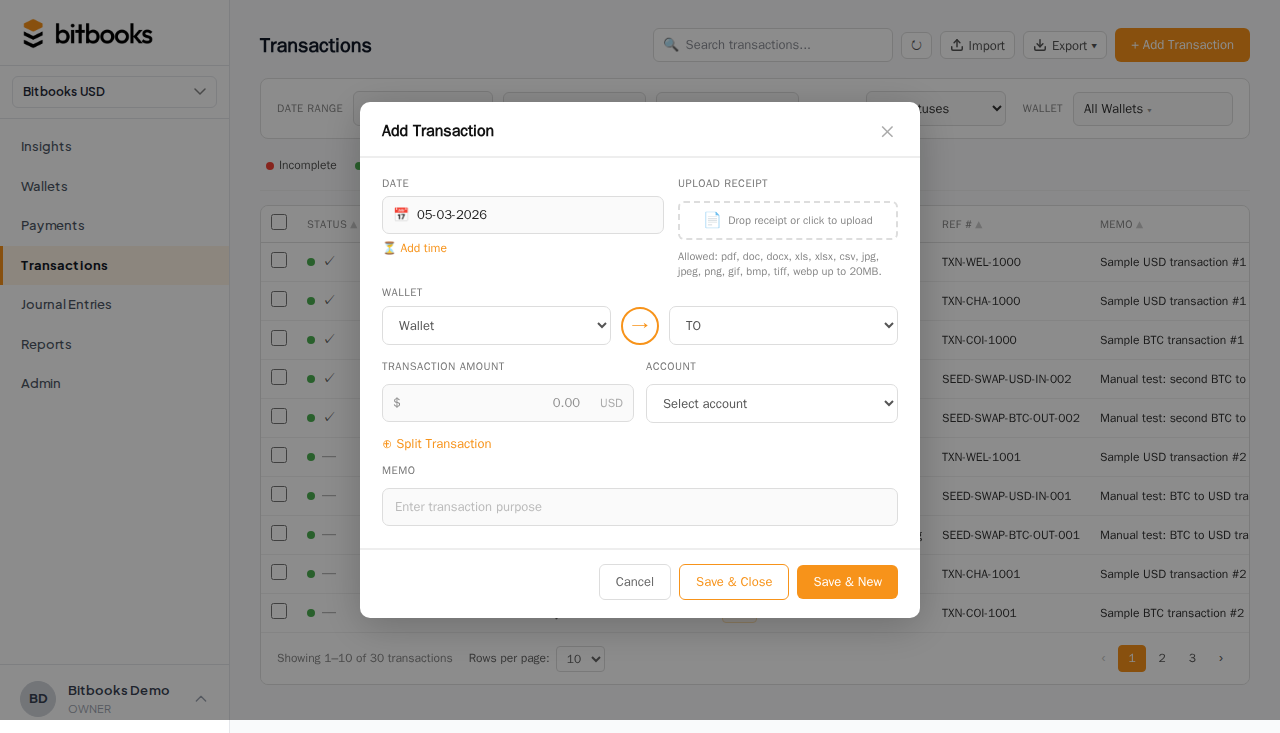
If you're entering it manually
- Transactions → New Transaction
- Mode: Standard
- Wallet: your Lightning wallet
- Direction: Money in
- Amount: the sats received
- Date: when the payment came in
- Time (optional): the exact moment if it matters
- Contact: the customer
- Category: the income account (Sales, Service Revenue, etc.)
- Save and post
The entry behaves identically to an auto-imported one, just without the round trip to the wallet provider.
What "category" should I use?
Depends on what the payment was for:
| Payment was for | Category |
|---|---|
| A product (coffee, beer, merchandise) | Sales (or a sub-account like "Sales: Coffee") |
| A service (consulting hour, design work) | Service Revenue |
| A tip on top of a sale | Tips Received (separate from Sales) |
| A refund of something the customer previously paid for | Sales with a negative amount, OR Refunds Issued |
| A donation | Donations Received (Other Income) |
| A loan from the customer | NOT income; record as Liability instead |
When in doubt, use Sales. You can re-categorize later by reversing and re-posting.
What about the exchange rate?
BitBooks fetches the BTC/USD (or BTC/your-currency) rate at the moment of the transaction. The rate is "pinned" to that transaction; it doesn't keep changing as the market moves.
So a 12,500-sat payment received when BTC is at $80,000 records as:
- 12,500 sats (the actual amount)
- $10.00 (12,500 sats × $80,000 / 100,000,000 sats/BTC)
The dollar value shows up on the P&L as Sales. The sats stay in your wallet.
Lightning fees
Some Lightning wallets pass Lightning routing fees to you (the recipient takes a slight discount). Some charge them as a separate fee. Most consumer-friendly wallets (Blink, etc.) pay the fees themselves and you receive the gross amount.
If a fee was deducted, it'll show up either as part of the receive (you got 12,500 sats but the customer sent 12,510, the 10-sat fee is implicit) or as a separate small expense entry.
For most small businesses, Lightning fees aren't material and you can ignore the breakdown. Record the gross sales amount and move on.
For high-volume Lightning operations where fees matter, see Lightning vs On-Chain for fee accounting patterns.
A worked example
A coffee customer scans a Lightning invoice for 5,000 sats. The payment lands in your Blink wallet 3 seconds later.
Auto-imported flow
[Draft]
Amount: 5,000 sats
Direction: Money in
Wallet: Blink Lightning Hot
Date: 2026-05-01
Contact: (blank)
Category: (blank, or Suspense)
You open the Draft. You set:
- Contact: Cash Customer (you don't track individual coffee customers)
- Category: Sales: Coffee
- Memo: "5k sats latte"
Save and post. The 5,000 sats are now in your Blink balance and your Sales: Coffee revenue increased by ~$4 (assuming BTC at $80,000).
Common questions
"What if the customer paid me and immediately disputed it?"
Lightning payments are settled and final. There's no chargeback equivalent. If the customer paid then ate the latte and walked out, the payment stands.
If you want to refund, send sats back as a separate transaction (record as a refund expense in your books).
"My Lightning payment is in 'Pending' status forever. What now?"
Lightning payments usually settle within seconds. If yours is stuck pending, the payment failed at the routing layer. Check with your wallet provider. The sats will return to the sender automatically.
If BitBooks shows it as Pending and you know it actually settled, click into the transaction and update the cleared status to Cleared.
"How do I track which customer paid which invoice?"
Use the Reference number field or Memo field to record the invoice number. Then your P&L drill-down shows which invoices generated which revenue.
For more formal invoice tracking, use the Payments page (payment requests) and link receipts to them. See Adding and Managing Contacts.
Where to go next
- The 10 Transaction Templates for shortcuts to common transaction shapes
- Bitcoin Connections for setting up auto-import from Lightning wallets
- Draft vs Posted for the entry lifecycle
- Lightning vs On-Chain for the broader Bitcoin accounting picture