Why this is a big deal
When you closed the period, you committed to those numbers being final. You may have shared reports based on them. Reopening means changing numbers that someone might have already used.
That's why BitBooks doesn't expose a one-click "reopen" in a flashy way. Reopening is a deliberate action, logged for audit, and you should think twice before doing it.
When reopening is the right call
Real cases where reopening makes sense:
- You discovered a material error that affects tax filings or significant reports, and the correction has to land in the original period (not as a current-period adjustment)
- An auditor flagged something that needs reclassification within the closed period
- A late-arriving transaction for the closed period that's significant enough to warrant restating
- You're correcting a setup mistake (e.g., the wrong functional currency was used)
For everyday corrections, prefer posting a correcting entry in the current period instead. See Period Close for the alternative-to-reopening pattern.
How to reopen
- Click Admin in the sidebar
- Stay on Settings tab
- Find Journal Lock Date
- Change to a date BEFORE the period you want to reopen
- Save
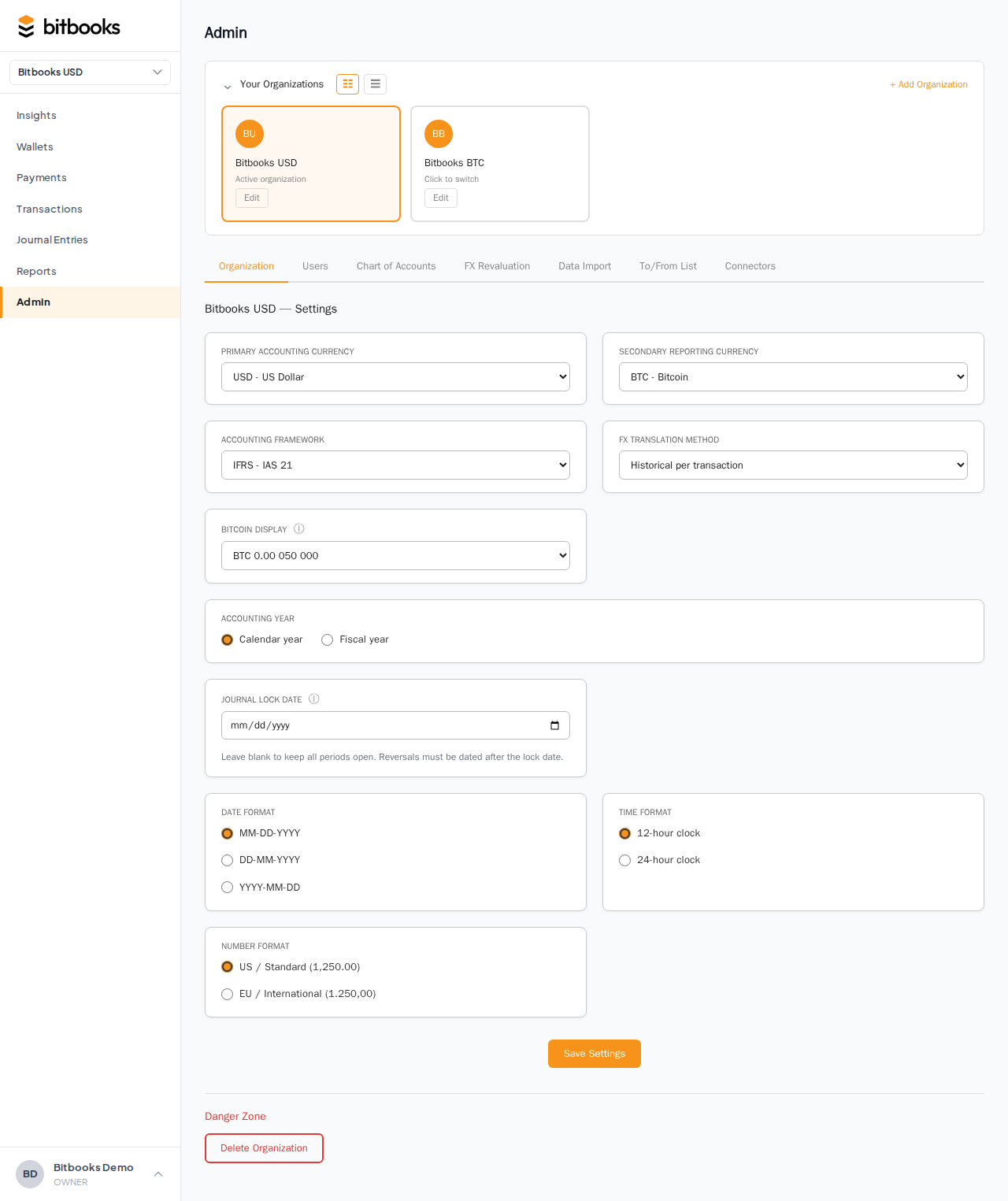
For example, to reopen February 2026: set the Lock Date to 2026-01-31 (or earlier). Now February is unlocked.
The change is recorded in the Activity Log, with the user who reopened, the previous lock date, and the new lock date.
After reopening
The locked period is now unlocked. You can:
- Edit existing entries in that period (amount, accounts, etc.)
- Create new entries dated in that period
- Delete drafts (rare; usually you'd reverse instead)
When you're done with corrections, re-lock immediately. Don't leave the period unlocked longer than necessary.
To re-lock: change the Lock Date back to the original closing date (or further forward, depending on what's now closed).
Communicate the change
If reports for the closed period have already been shared:
- Email or notify the recipients that the period was reopened and numbers may have changed
- Send updated reports if the changes are material
- Document why the reopen happened (the audit reason in your accounting notes is the formal record)
This is professional courtesy and standard accountant practice. Quietly changing numbers without notice is how trust evaporates.
What if the change affects multiple closed periods?
Common scenario: you discover a January error in May. The error has cascaded forward. To fully correct:
- Reopen back to before January (set Lock Date to 2025-12-31)
- Post the correction in January
- Re-lock through April (the periods that have already been re-stated by the cascade)
Each period in between gets re-recomputed. The reports for January, February, March, April will all show updated numbers.
This is invasive. Strongly consider whether a current-period correcting entry would suffice. If the error is below materiality threshold, a current-period correction is almost always better than a multi-period reopen.
What you can't do during a reopen
A few things to keep in mind:
- You can't selectively reopen one period without affecting later ones. The Lock Date is a single line. Setting it earlier exposes ALL periods after that line as unlocked.
- You can't "undo" a reopen. Once reopened and changes made, the changes are real. You can re-lock to prevent further changes, but you can't unmake what was done. Use the audit log to see what changed; reverse if necessary.
The audit trail
Every reopen is logged in the Activity Log. Anyone reviewing later (an accountant, an auditor, your future self) can see:
- The exact date of the reopen
- Who reopened
- The previous and new lock dates
- All the changes made between reopen and re-lock
Don't try to hide a reopen. The audit trail makes it visible. Better to over-document than under-document.
A worked example
It's May 15, 2026. You closed January (Lock Date = 2026-01-31) on February 5. You sent the January P&L to your investor on February 6.
On May 15, you discover that one of January's transactions had the wrong amount. It was recorded as $1,000 but should have been $10,000. The investor's January P&L is wrong by $9,000.
What to do:
- Decide if reopening is worth it. $9,000 difference is material; reopening makes sense here.
- Email the investor: "We discovered an error in January's P&L. We're correcting and will send updated reports. Apologies for the change."
- Set Lock Date to 2025-12-31 (reopens January)
- Open the wrong transaction. Change the amount to $10,000. Save.
- Set Lock Date back to 2026-01-31 (re-closes January)
- Re-run January's P&L
- Send corrected report to the investor
- Document in your internal notes what happened, when, and why
Total time: 30 minutes. Trust preserved by transparent communication.
When NOT to reopen
If the error is small (a few dollars), a current-period correcting entry is almost always better:
- Less paperwork
- No need to communicate to past report recipients
- The audit trail is cleaner (one entry in May instead of disrupted historical reports)
Talk to your accountant. The materiality threshold for "must restate vs can correct in current period" is judgment-based.
Common questions
"Will my P&L show the correction in January or in May?"
If you reopen and post-in-January: January's P&L changes, May's P&L is unaffected.
If you post a current-period correcting entry in May: January stays as it was (with the original error visible in the audit log), May's P&L absorbs the correction.
Pick based on which feels more appropriate to your situation and your auditor's preferences.
"Can I reopen a period without changing anything, just to look around?"
You can. Reopening doesn't force changes. But the reopen-and-relock cycle is logged regardless. If you only wanted to look, run reports for the period instead (reports work in locked periods).
"What's the worst case if I forget to re-lock after reopening?"
The period stays open. Any new entries can land in it; existing entries can be edited. Your historical numbers become unstable. Always re-lock before you walk away.
Where to go next
- Period Close for the broader concept
- How to Close a Month for the close walkthrough
- What Happens When a Period is Locked for the lock behavior
- Reversing a Posted Entry for the alternative to reopening
- Activity Log to see when reopens have happened