What "stuck" means
You have a Draft entry that's misbehaving:
- It won't save (every save fails)
- It won't post (the Save and Post button does nothing or errors)
- It won't delete (the Delete button errors)
- The form shows old values that you can't change
- The browser shows a spinner that never resolves
Most of these are transient. A few simple steps clear them up.
Step 1: refresh the page
The simplest fix:
- Save the form (or close it without saving if save isn't working)
- Reload the browser (Ctrl+R or Cmd+R)
- Open the Draft again
This clears any stale form state. About 80% of "stuck" Drafts resolve here.
Step 2: check for required fields
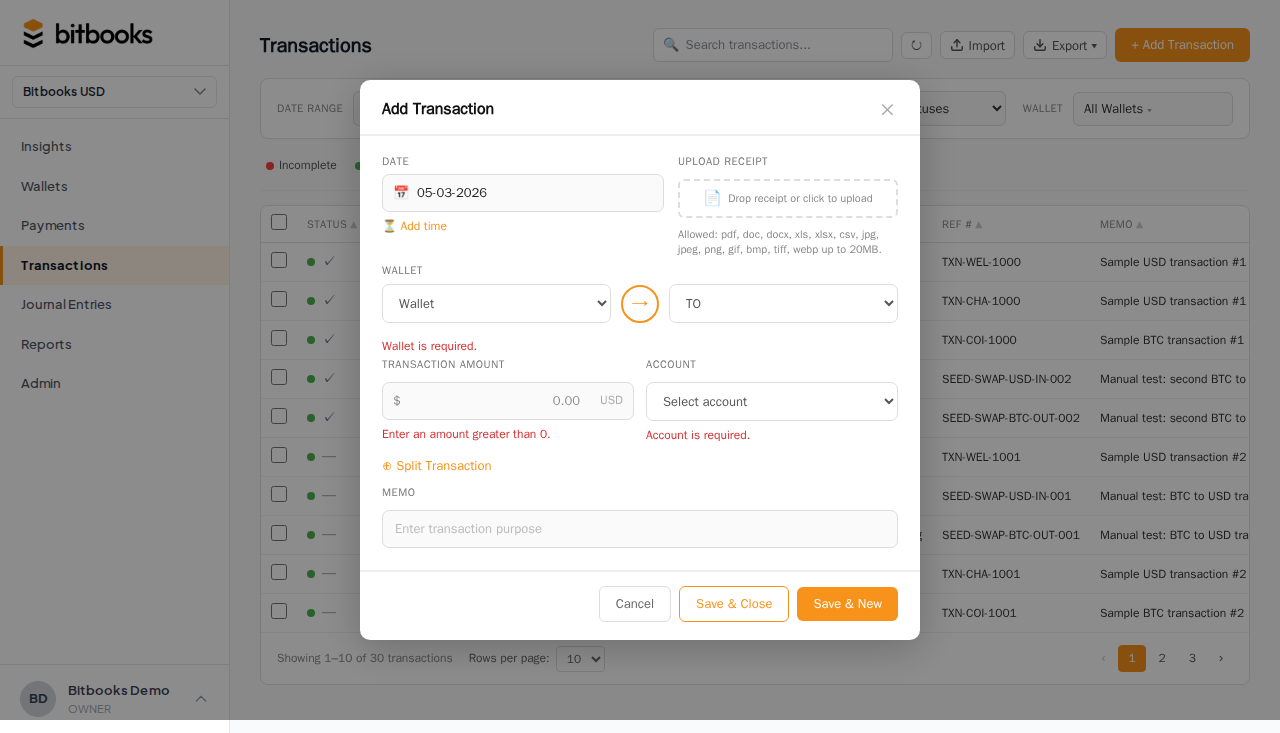
If the form won't save, look for required-field errors:
- Wallet (every transaction needs one)
- Amount (must be a positive number)
- Date (must be a valid date)
- Direction (money in or money out)
- Currency (usually inferred from wallet, but may need explicit selection)
Errors usually show inline next to the field. Scroll the form looking for red highlights.
For journal entries: debits must equal credits. The form footer shows the running total; if it's not zero (balanced), save fails.
Step 3: try a different browser
Browser extensions or cached state can interfere. Open BitBooks in a different browser (or an incognito window). Try the action there.
If it works: the issue is your primary browser's state. Clear cache for the BitBooks domain or disable extensions.
If it still doesn't work: the issue is server-side or in your data. Continue diagnosing.
Step 4: check the network tab
If you're comfortable with browser developer tools:
- Open DevTools (F12)
- Click the Network tab
- Try the action that's failing
- Look at the failed request
The response (red rows) often shows an error message that hints at the cause:
- 400 = bad data (form fields invalid in some way)
- 401/403 = permission issue
- 500 = server error (rare; report to support)
Send the error response to support if you can't interpret it.
Step 5: check the period lock
If you're trying to save a Draft with a date in a locked period, save will fail with an error: "Locked period."
Either:
- Change the Draft's date to a current-period date
- Reopen the locked period (with caution; see Reopening a Closed Period)
For everyday clean-up, changing the date to today is the easier path.
Step 6: check for pending exchange rates
If the entry has multi-currency lines and one currency's rate is Pending, save may behave oddly. Look at the line detail; if rate is shown as Pending, click Retry pending rates to resolve.
Once rates resolve, the entry can post.
Step 7: try deleting and starting over
If the Draft is genuinely stuck and Steps 1-6 don't help:
- Open the Draft
- Click Delete (Drafts can be deleted, unlike Posted entries)
- If delete fails too: contact support with the Draft's ID
If delete succeeds, recreate from scratch. Often the new entry posts cleanly because the stuck-state quirks don't repeat.
When delete won't work
If even delete fails:
- The Draft might be in an inconsistent state on the server
- A related entity (a wallet, a contact) might have a constraint preventing deletion
- A bug
Send to support:
- The Draft's slug or ID (visible in the URL when you have the Draft open)
- The error you're seeing
- What you've tried
Most stuck-Draft scenarios are resolvable on the backend.
Preventing future stuck Drafts
A few habits that help:
Save frequently
Don't keep a half-finished Draft open for hours. Save what you have, come back later. Browser state lasting a long time is more likely to drift out of sync with the server.
Don't open the same Draft in multiple tabs
Two tabs editing the same Draft can produce inconsistent state. Pick one.
Refresh before posting in long-running sessions
If you've been working in BitBooks for hours, refresh before posting big entries. Long-running sessions accumulate cruft.
Use Save and Post when you're sure
If you're sure the entry is right, click Save and Post rather than two clicks. Reduces the window where things can go wrong mid-flow.
A worked example
You've been entering March's transactions. You're on entry #15. You click Save. Spinning wheel. Three minutes pass. Nothing happens.
Step 1: refresh the browser.
Reopen entry #15. The form shows the data you'd typed. Try save again. It works this time.
The original spinner was likely a network glitch or backend hiccup that didn't resolve. Refresh kicked it loose.
Common questions
"I've been waiting 5 minutes for save to complete. Is it still saving?"
No. Saves should be near-instant. After 30 seconds with no result, assume it failed and refresh. The data you typed is still in the form (browser-side); you can re-save after refresh.
"My Draft says 'unsaved changes' but I can't save. What now?"
The unsaved changes are in your browser, not on the server. Try Step 1 (refresh) but copy your data out first (e.g., into a text file) so you don't lose it.
After refresh, paste the data into a new Draft. Save fresh.
"What if my organization has a custom workflow that requires a specific value to save?"
Some org configurations require certain fields (e.g., approval threshold means amounts above a level go into Pending). The form should tell you what's required. If you're getting save errors but no clear message, contact support.
Where to go next
- Draft vs Posted for the entry lifecycle
- Bulk Posting Drafts for handling many Drafts at once
- Period Close for understanding locked periods
- Wrong Exchange Rate on a Transaction for rate-pinning issues