The short answer
Most businesses operate in one currency. But a Bitcoin business inherently operates in at least two (your home currency and BTC), and many also report in a third (a parent company's currency, an investor's currency, etc.).
BitBooks handles all of this with three currency "slots":
| Slot | Purpose | Required? |
|---|---|---|
| Transactional | The currency a specific transaction actually happened in | Per transaction |
| Functional | Your books' main currency. Reports default to this. | Yes (one per organization) |
| Reporting (secondary) | A second currency that shows alongside the functional currency on reports | Optional |
That's the three-currency model. Let's unpack each one with examples.
Why three?
Imagine a Canadian Bitcoin business. It mostly operates in Canadian dollars: rent is in CAD, salaries are in CAD, the bank account is in CAD. But it also accepts Lightning payments in BTC, occasionally invoices a US customer in USD, and reports to a US parent company that wants to see everything in USD.
In a system that only understands one currency, you'd be doing manual conversion all over the place. Someone paid you 0.05 BTC? You convert to CAD, lose the original BTC information. Now your books say "you received CAD$3,000," but your accountant looking back at year-end has no record that this was actually a Bitcoin payment, no Bitcoin gain/loss tracking, no trail of the original transaction.
The three-currency model keeps all three numbers without losing any.
Slot 1: Transactional currency
This is the currency the transaction actually happened in.
A coffee customer paid you 12,500 sats? The transactional currency is BTC, the amount is 12,500 sats.
You wired CAD$5,000 to a vendor? Transactional currency is CAD, amount is 5,000.
You bought office supplies in pesos on a business trip? Transactional currency is MXN, amount is whatever you paid.
The transactional currency stays attached to the original transaction forever. It never gets lost or overwritten.
Slot 2: Functional currency
The functional currency is your organization's main currency. It's the currency you think in, do most of your business in, and want your books to be denominated in.
For a US-based business, this is almost always USD. For a Canadian business, CAD. For a UK business, GBP. For a European business, EUR. For a pure Bitcoin treasury company, BTC.
You set this once, when you create your organization (see Setting Up Your First Organization).
What the functional currency does:
- It's the default currency for new transactions when you don't specify one
- Reports (P&L, Balance Sheet, etc.) default to displaying numbers in this currency
- When transactions in other currencies happen, BitBooks converts them to the functional currency at the appropriate exchange rate
- Tax filings (which are typically in your home currency) use this currency
Example. If your functional currency is USD and you record a transaction for €1,000 EUR, BitBooks looks up the EUR/USD rate at the transaction date and stores both: the original €1,000 and the converted USD equivalent (say $1,080). Reports in USD show $1,080. If you ever need the original EUR back, it's still there.
Slot 3: Reporting (secondary) currency
The reporting currency is an optional second currency that shows alongside your functional currency.
When would you use this?
- Canadian business reporting to a US parent. Functional CAD, Reporting USD.
- European subsidiary of a UK group. Functional EUR, Reporting GBP.
- Bitcoin-functional treasury that wants to show USD equivalents. Functional BTC, Reporting USD.
- Stakeholder communication. Investors who think in USD even if you operate in CAD.
When set, every report shows two numbers per line: the functional value and the reporting value, side by side. Stakeholders can read either one and be on the same page.
If you don't have a use case, leave the reporting currency blank. You can always add one later.
A worked example
Let's run through a single transaction in a Canadian business with these settings:
- Functional currency: CAD
- Reporting currency: USD
You receive a Lightning payment of 0.0008 BTC from a customer.
What gets stored:
- Transactional currency: BTC
- Transactional amount: 0.0008 BTC
- Exchange rate at the time: 1 BTC = $90,000 CAD = $66,000 USD
- Functional value: 0.0008 × $90,000 = $72.00 CAD
- Reporting value: 0.0008 × $66,000 = $52.80 USD
What appears on reports:
- A P&L in CAD: shows $72.00 in revenue
- A P&L in USD (the reporting currency view): shows $52.80
- The transaction detail page: shows all three (BTC, CAD, USD) with the exchange rates BitBooks used
You never lose information. Anyone reading the books can answer: how much BTC did we receive? How much was that in CAD? How much in USD? All three answers are there.
Setting your functional currency
Done at organization setup. To change later:
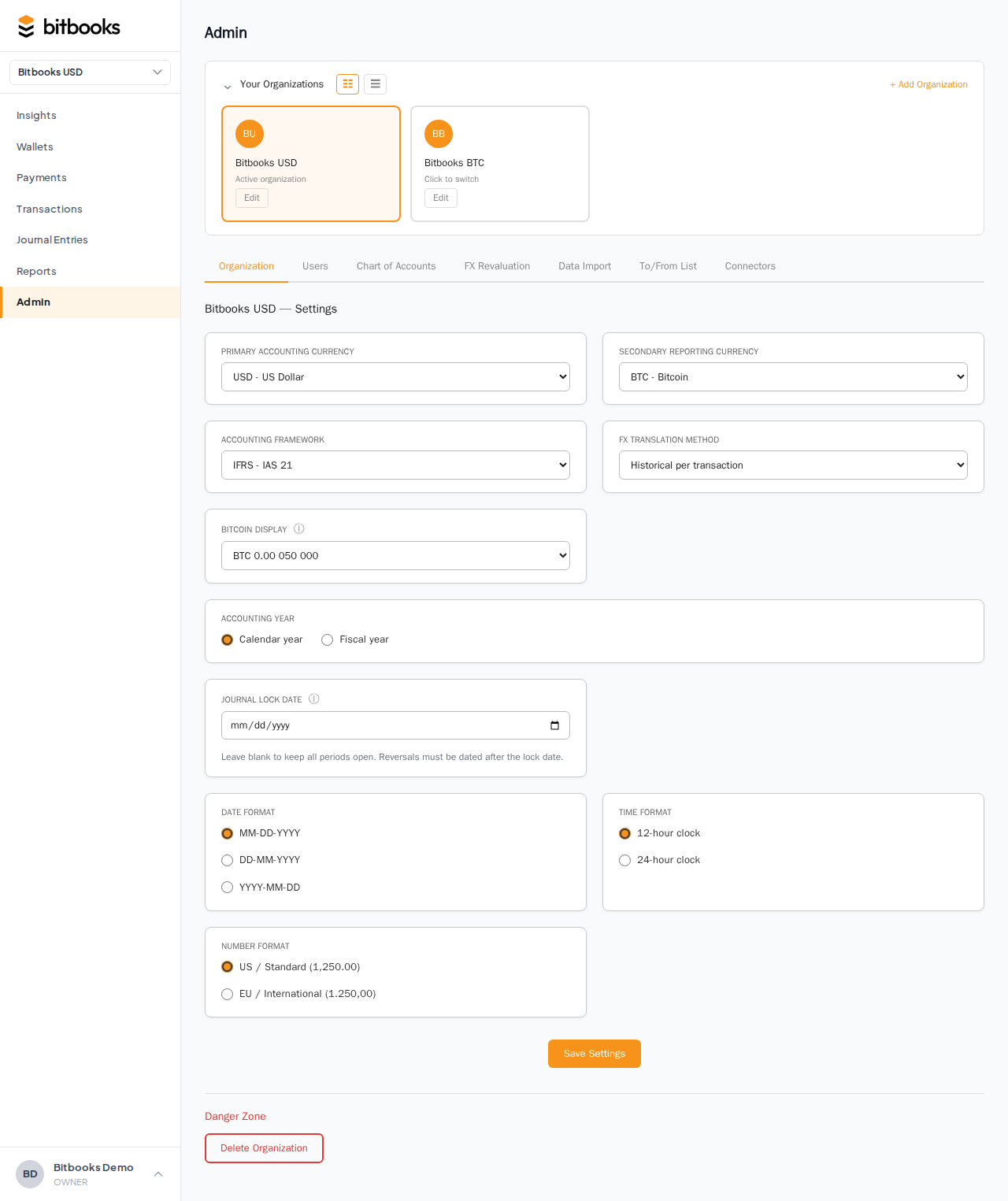
- Go to Admin → Settings
- Find Primary accounting currency
- Pick a new value
- Click Save
If your organization already has transactions, BitBooks will ask for an effective date and an audit reason (a free-text explanation of why the change is happening). This is required by accounting standards: a functional currency change is a material event that affects how historical numbers are interpreted.
After the change, transactions before the effective date keep their old functional value. Transactions on or after the effective date use the new functional currency. Reports clearly indicate when the change happened.
Setting your reporting currency
Same place, Admin → Settings. Find Secondary reporting currency. Pick one (or "None"). Click Save.
Unlike the functional currency, you can change the reporting currency at any time without an audit trail. It's a display preference, not an accounting decision.
How exchange rates are picked
BitBooks fetches exchange rates from external providers. For fiat-to-fiat conversions (USD/EUR, CAD/USD, etc.), the default provider is Open Exchange Rates. For Bitcoin pricing, CoinGecko is the default.
Each transaction is "rate-pinned" at the moment of posting. That means: the rate used at the time of posting is saved with the transaction and never changes, even if the live rate changes later. This is required for accurate accounting (you can't retroactively change historical rates).
If a rate provider is temporarily unavailable, transactions might land in a "Pending rate" state, meaning the conversion hasn't been resolved yet. BitBooks shows a warning at the top of the Transactions and Journal Entries pages when this happens, with a "Retry pending" button to refetch.
Common questions
"My functional currency is BTC. How does that work for tax filings?"
Most jurisdictions require tax filings in the local fiat currency. If you're functional in BTC, you'll need to convert to your home currency (USD, CAD, etc.) for tax purposes. Setting a reporting currency to your local fiat keeps that view always available, ready to export.
"Can I change a single transaction's exchange rate?"
Yes, on the transaction detail page, but only while the transaction is a Draft. Once Posted, the rate is locked. To correct a posted transaction's rate, reverse it and post a corrected version.
"Why is my BTC balance value changing every minute?"
That's the live BTC price moving, which BitBooks displays on the Insights page in your reporting currency. Your actual BTC balance (the number of sats or BTC) doesn't change. Only its dollar equivalent fluctuates as the market moves.
Where to go next
- Setting Your Functional Currency for the deeper how-to
- How Exchange Rates Work in BitBooks for the rate-fetching mechanics
- Tracking Bitcoin Value Changes for FX revaluation runs (capturing unrealized gains and losses)
- BTC Display Modes if you want to change how BTC amounts appear on screen