The simple answer
A wallet in BitBooks is anything that holds money for your business. It can be:
- A Bitcoin Lightning wallet (Blink, etc.)
- A Bitcoin on-chain wallet (hardware wallet, software wallet, exchange wallet)
- A bank checking or savings account
- A credit card (counted as a wallet because it tracks money flow)
- A petty cash drawer
- A stablecoin holding (USDC, etc.)
If money flows in and out of it for your business, it's a wallet in BitBooks.
Why everything is a "wallet"
Other accounting tools call these "bank accounts" or "credit cards" or "GL accounts." They use different vocabulary depending on the asset. BitBooks uses one word: wallet. Reasons:
- Bitcoin businesses naturally have wallets (the Lightning wallet, the cold storage wallet, etc.)
- Treating bank accounts as a kind of wallet keeps the data model uniform
- Customers don't have to learn three different names for the same concept
A bank account in BitBooks is just a wallet whose currency is USD/EUR/CAD/etc. and whose walletType is BANK.
Wallet types
Each wallet has a type that signals what it is:
| Type | What it is |
|---|---|
| EXCHANGE | A custodial exchange account (Coinbase, Kraken, Blink) |
| HARDWARE | A self-custody hardware wallet (Trezor, Ledger) |
| SOFTWARE | A self-custody software wallet (Electrum, BlueWallet, xpub watch-only) |
| CUSTODIAL | A non-exchange custodial setup (managed wallet provider) |
| BANK | A traditional bank account (checking, savings, credit card) |
Picking the right type doesn't change much functionally; it's mostly informational and affects some report groupings. Pick what feels closest. You can change it later.
What you see on the Wallets page
The Wallets page lists every wallet in the organization. For each wallet:
- Name. What you call it.
- Currency. The currency it holds (BTC, USD, etc.).
- Type. Exchange / Hardware / Software / Custodial / Bank.
- Institution. Who hosts or issues the wallet (Blink, Chase, etc.).
- Current balance. How much is in it right now.
- Sync status. Synced, Syncing, Error, or Never (for manual wallets).
- Last synced. When the last auto-sync ran.
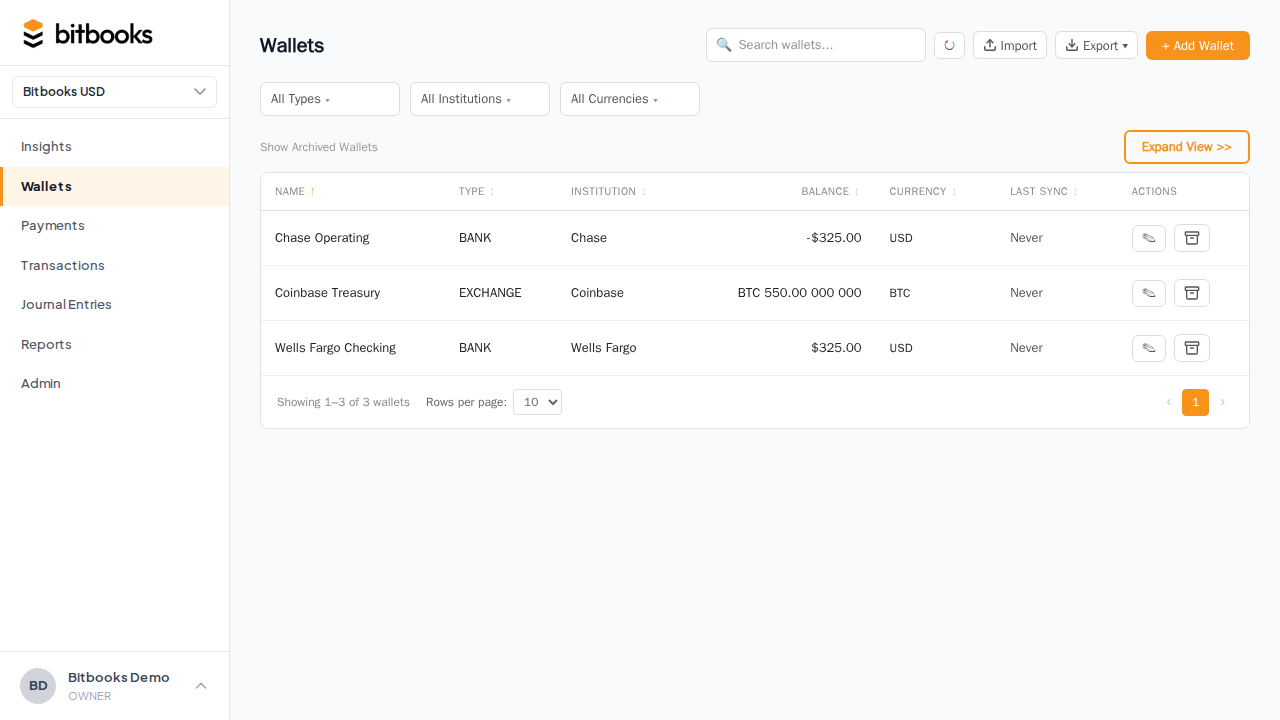
Click any wallet to see its detail page: full transaction history, opening balance, sync controls, statement, reconcile.
Wallets and the Chart of Accounts
Every wallet in BitBooks is also an account in your Chart of Accounts. They're two views of the same thing.
When you create a wallet, BitBooks automatically creates a corresponding account under the appropriate Asset sub-type (WALLETS for Bitcoin/crypto, OTHER_CURRENT_ASSETS for bank accounts, depending on configuration).
The wallet appears in the Wallets list. The account appears in the Chart of Accounts. Same underlying data.
Why this matters: you don't have to manage them separately. Add a wallet, and the account is set up. Edit either side, and it stays consistent.
Two ways to create a wallet
Connected (auto-sync). Use the Bitcoin Connections feature to link a wallet to its provider. Transactions auto-import. See Connecting Your Bitcoin Wallet.
Manual. Create the wallet by hand and enter transactions yourself. Useful for bank accounts (we don't auto-sync banks yet), cold storage (no live connection), or anything with no API. See Creating a Wallet by Hand.
You can mix both. Some wallets connected, some manual.
Currency
Each wallet holds exactly one currency. A "BTC Hot Wallet" is BTC. A "Chase Checking" is USD. You can't have one wallet that holds both.
If you operate across currencies (which Bitcoin businesses do by definition), you create multiple wallets. One per currency.
The currency is set at wallet creation. It's hard to change after; if you need a different currency, archive and recreate.
Opening balance
When you create a wallet, you set:
- Opening balance = how much was in it when you started tracking
- Start date = the date that opening balance was true
BitBooks records this as a journal entry on the start date. From there, every transaction adjusts the balance.
If the opening balance is wrong, every running balance after it is wrong too. Get it right at creation.
Archiving a wallet
If you stop using a wallet (closed the bank account, drained the Lightning wallet to cold storage and won't use it again), archive it:
- Open the wallet
- Click Archive
Archived wallets:
- Disappear from the active wallet list
- Don't show in dropdowns when creating new transactions
- Keep their full transaction history
- Can be restored
Don't delete wallets. Always archive. Deletion would orphan past transactions; archiving keeps them intact.
Common questions
"Can I rename a wallet?"
Yes. Open the wallet, click Edit, change the name, save. The corresponding account in your Chart of Accounts renames too.
"How many wallets is too many?"
No hard limit. Most businesses have 3-10 wallets (a hot wallet, cold storage, one or two bank accounts, a credit card). If you're growing past 20, consider whether some should be archived.
"Can two wallets have the same currency?"
Yes. You might have a hot Lightning wallet and a cold storage on-chain wallet, both BTC. They're separate wallets with separate balances.
Where to go next
- Connecting Your Bitcoin Wallet for auto-sync setup
- Creating a Wallet by Hand for manual wallets
- Wallet Types for the type-by-type details
- Setting Spending Limits per Wallet for safety controls