The short answer
BitBooks is bookkeeping software built for businesses that hold or earn Bitcoin. It looks and feels like QuickBooks or Xero, except it actually understands what Bitcoin is, where it lives, and how its value moves.
You use BitBooks to:
- Track every dollar and every satoshi your business sends, receives, and holds
- Connect your Bitcoin wallets so transactions import automatically
- See your profit, your balances, and your tax-ready reports in one place
- Hand a clean set of books to your accountant, your investor, or the tax preparer
If you're used to QuickBooks for your dollar accounts and a separate spreadsheet for Bitcoin, BitBooks puts them in one tool.
The problem BitBooks solves
Every accounting tool ever built was designed for one assumption: money is a number that doesn't move. A US dollar today is a US dollar tomorrow. Old accounting tools record an amount, store it, and forget about it.
Bitcoin breaks that assumption.
When you receive 0.1 BTC, that 0.1 BTC might be worth $6,000 today, $7,500 next month, $5,200 the month after. You haven't done anything, but the value of what you own keeps changing. Old accounting tools don't know what to do with that.
So Bitcoin businesses end up doing this:
- Use QuickBooks for everything except Bitcoin
- Track Bitcoin in a spreadsheet
- At month-end, manually combine the two
- Hope nothing got missed
BitBooks replaces all three steps. It's one tool that knows about both kinds of money.
What you can do in BitBooks today
Track wallets and accounts
Set up wallets the way you actually use them. One for your Lightning hot wallet (the one that sends and receives small amounts daily), one for cold storage (the long-term reserve), one for a fiat checking account, one for a credit card. Each wallet has its own balance, its own transaction history, and its own currency.
Auto-import Bitcoin transactions
Connect a wallet provider (Blink today, more on the way) and BitBooks pulls in the transactions for you. No CSV exports, no copy-paste. The connection is sealed with a password that only you know. More on this in the Bitcoin Connections article.
Record any kind of transaction
A customer paid you in Lightning? Record it. You bought a laptop with the company credit card? Record it. You moved BTC from the hot wallet to cold storage? Record that too. BitBooks handles purchases, sales, transfers, payments, refunds, and journal entries.
See live numbers
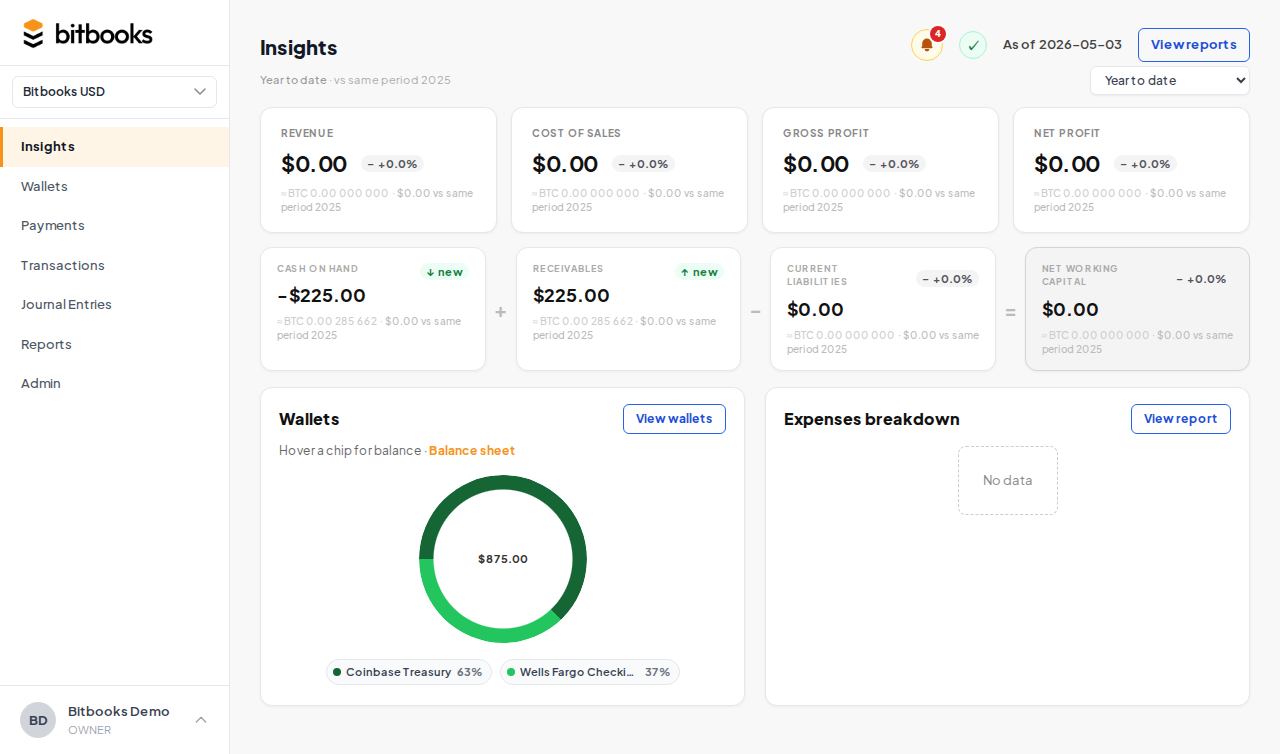
Your Insights page (what other tools call a Dashboard) shows you revenue, expenses, gross profit, working capital, and your wallet balances. Everything updated as you work. Compare to last month, last year, or any custom period.
Run any standard report
Profit & Loss. Balance Sheet. Cash Flow. General Ledger. Trial Balance. Activity log. The same reports your accountant expects from QuickBooks, except the Bitcoin numbers are correctly handled.
Multi-currency by design
Most businesses track everything in one currency (their "functional currency"). BitBooks lets you pick yours: US dollars, euros, Canadian dollars, pounds, or Bitcoin itself. You can also pick a second reporting currency that shows up alongside the first on every report. Useful if you operate in CAD but report to a US parent in USD, for example.
Display Bitcoin the way you think about it
A Lightning developer thinks in satoshis. A long-term holder thinks in BTC. A merchant thinks in dollars. BitBooks lets you flip between all four display modes, and your team can each pick the one they prefer.
How BitBooks compares
| BitBooks | QuickBooks | Xero | A spreadsheet | |
|---|---|---|---|---|
| Bookkeeping basics (P&L, BS, GL) | Yes | Yes | Yes | Painful |
| Auto-imports Bitcoin transactions | Yes | No | No | No |
| Tracks Bitcoin value changes properly | Yes | No | No | Manual |
| Lightning payments | Yes | No | No | Manual |
| Multi-currency including BTC | Yes | Limited | Limited | Manual |
| Period close, audit log, immutable posts | Yes | Yes | Yes | No |
| Sats, BTC, or Bitcoin display modes | Yes | No | No | Manual |
The short version: if you don't touch Bitcoin, QuickBooks is fine. The moment Bitcoin enters the picture, BitBooks does work that the others simply weren't built for.
Who uses BitBooks
- Small Bitcoin businesses (coffee shops, online stores, freelancers) that accept Lightning or on-chain payments and need clean books
- Bitcoin treasuries, companies holding BTC as a reserve and needing to report its value correctly to investors and tax authorities
- Bookkeepers and accountants managing one or several Bitcoin-business clients and tired of the spreadsheet-and-prayer workflow
- Mining operations tracking electricity costs against block rewards
- Lightning startups, companies building products that move sats every second and need their books to keep up
If your business has any Bitcoin exposure beyond the occasional hobbyist transaction, BitBooks pays for itself by removing the spreadsheet step.
What BitBooks isn't
A few things it deliberately doesn't try to be:
- Not a wallet. BitBooks doesn't hold your Bitcoin. Your coins stay in your wallet (Blink, your hardware wallet, your cold storage, wherever they live now). BitBooks only reads the transaction history.
- Not a tax filer. BitBooks gives you the reports your tax preparer needs. It doesn't file your taxes for you.
- Not a payment processor. It records what happened. It doesn't accept new payments on your behalf.
- Not an exchange. You can't buy or sell Bitcoin inside BitBooks. You record those transactions after they happen at your wallet, exchange, or counterparty.
The principle: BitBooks records the truth about what your business owns and what it has done. The actual handling of money lives at your wallets and your bank.
A quick mental model
If it helps, here's the simplest way to think about it:
BitBooks is a notebook with very strong opinions. Every dollar and every satoshi your business touches should land in the notebook. The notebook then turns those entries into reports, for you, for your accountant, for the tax authority.
The notebook is double-entry. Every transaction has two sides, one side puts money in somewhere, the other side takes it out somewhere. It's permanent. Once you mark something final, it stays final, with a paper trail of any corrections. And it understands Bitcoin. A satoshi today and a satoshi next month aren't the same dollar amount, and the notebook handles that for you.
Where to go next
- First time using BitBooks? Start with Setting Up Your First Organization.
- Want to connect a Bitcoin wallet? See Connecting Your Bitcoin Wallet.
- Curious about an accounting concept? Check the Glossary for Bitcoin Users.
- Stuck on something? Use the chat widget at the bottom-right of any BitBooks screen, or email support@bitbooks.com. A real person will get back to you.