The simplest explanation
The Chart of Accounts is the list of buckets your money lives in.
When you spend money on rent, it goes in the "Rent" bucket. When a customer pays you, the money goes in the "Sales" bucket. When you put money in your bank account, that bucket is "Cash on Hand."
Every transaction in your business uses at least two of these buckets (because every transaction has two sides: where the money came from and where it went). The Chart of Accounts is just the master list of every bucket you use.
Other names for the same thing: CoA, "the chart," "the accounts list," or just "accounts."
A real example
A small Bitcoin coffee shop's Chart of Accounts might look like this:
ASSETS (what we own)
  1010 Cash on Hand                  (the bank account)
  1110 BTC Hot Wallet                (Lightning, daily ops)
  1115 BTC Cold Storage              (long-term reserve)
  1200 Accounts Receivable           (customers who haven't paid yet)
  1500 Office Equipment

LIABILITIES (what we owe)
  2010 Accounts Payable              (vendor bills not yet paid)
  2100 Credit Card

EQUITY (owner's stake)
  3010 Owner's Capital
  3100 Retained Earnings

INCOME (money coming in)
  4010 Sales: Coffee
  4020 Sales: Pastries
  4030 Tips Received

EXPENSES (money going out)
  5010 Cost of Coffee Beans
  5020 Cost of Milk and Pastries
  6010 Rent
  6020 Utilities
  6030 Salaries
  6040 Marketing
  6050 Software Subscriptions
  6900 Other Expenses
That's a Chart of Accounts. About 20 buckets, organized into five top-level groups.
The five top-level groups
Every account in any business belongs to one of five categories. These are the same in every accounting tool, every accounting framework, every country:
Assets
Things the business owns. Cash, accounts receivable, inventory, equipment, Bitcoin wallets, real estate. Anything of value.
Liabilities
Things the business owes. Accounts payable to vendors, credit card balances, loans, taxes due.
Equity
The owners' stake. What's left after subtracting liabilities from assets. Includes the original investment ("Owner's Capital") and accumulated profits over time ("Retained Earnings").
Income
Money coming in from your normal business activities. Sales, service fees, interest received.
Expenses
Money going out for normal business operations. Rent, salaries, supplies, marketing, all the costs of running.
Why the structure matters
The five groups directly determine how your reports look:
- Balance Sheet shows Assets, Liabilities, and Equity
- Profit & Loss shows Income and Expenses
Every account you create has to belong to one of these five groups, because that's how reports get built. If an account's group is set wrong, it shows up in the wrong place on reports, and the numbers don't make sense.
What BitBooks gives you out of the box
When you create a new organization in BitBooks, the system automatically sets up about 40 default accounts covering the categories most businesses need. You don't have to design a Chart of Accounts from scratch.
The defaults follow standard QuickBooks/Xero conventions. Anyone with bookkeeping experience will recognize the structure immediately.
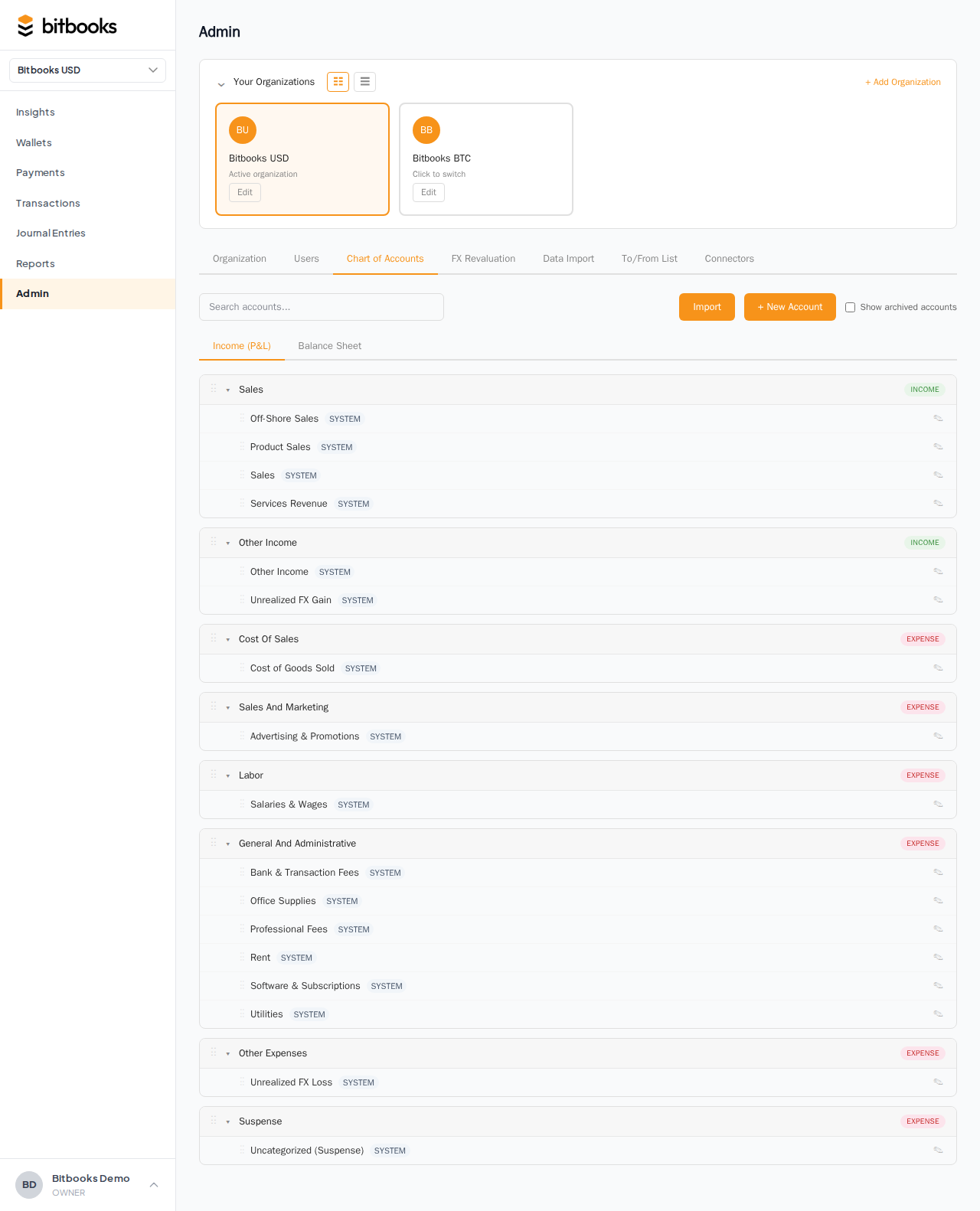
To see your current Chart of Accounts:
- Click Admin in the sidebar
- Click Chart of Accounts tab
You'll see the table of accounts, grouped by type.
Account codes (those numbers)
You'll notice each account has a number, called a code:
1010  Cash on Hand
1110  BTC Hot Wallet
4010  Sales: Coffee
6010  Rent
The code is just a way to organize accounts in a predictable order. The first digit follows a convention used worldwide:
| First digit | Type |
|---|---|
| 1 | Assets |
| 2 | Liabilities |
| 3 | Equity |
| 4 | Income |
| 5 | Cost of Sales |
| 6, 7, 8 | Expenses |
| 9 | Other |
So if you see an account starting with 4, you know it's Income. Starting with 6, it's an operating expense. The convention isn't strictly required but makes navigation easier.
In BitBooks, codes are optional. You can use them if you want a specific numeric structure, or leave them blank if you'd rather just rely on names. Most users keep them.
Sub-types: a finer breakdown
Each top-level group breaks down into sub-types. For example, under Assets:
- WALLETS (your wallet accounts)
- OTHER_CURRENT_ASSETS (cash, receivables)
- FIXED_ASSETS (equipment, vehicles, property)
- OTHER_ASSETS (deposits, intangibles, prepaids)
Sub-types determine where the account appears within its section on reports. A wallet under WALLETS shows up in the wallet section of the Balance Sheet. Office Equipment under FIXED_ASSETS shows up under Fixed Assets.
When you create a new account, you pick both the type and the sub-type.
Wallets are accounts too
In BitBooks, every wallet you create is also an account in the Chart of Accounts. A "Blink Lightning Hot" wallet is also a "Blink Lightning Hot" account in the CoA, with sub-type WALLETS, type Asset.
This is by design. The Chart of Accounts is the single source of truth for everything that holds value. Wallets are just a kind of account.
You manage the wallet from the Wallets page. You see its accounting in the Chart of Accounts. They're two views of the same underlying data.
Customizing your Chart of Accounts
The 40 defaults are a starting point. Most businesses add a few custom accounts:
- A coffee shop might add "Cost of Coffee Beans" and "Cost of Milk" under Cost of Sales for granular tracking
- A SaaS company might add "Cloud Hosting" and "Customer Support Tools" under Operating Expenses
- A Bitcoin mining operation might add "Mining Equipment Depreciation" and "Electricity for Mining"
To create a custom account:
- Admin → Chart of Accounts
- Click New Account
- Fill in name, type, sub-type, optional code
- Save
The new account is immediately available in transaction forms.
You can also archive accounts you don't use (clean up the chart), edit names, and reorganize. Just don't delete accounts that already have transactions; archive them instead.
What changes for Bitcoin businesses
The five groups are universal. The accounts within those groups vary by business type. For Bitcoin businesses, common additions:
Asset accounts:
- BTC Hot Wallet, BTC Cold Storage (one per wallet you operate)
- BTC Receivables (customers who paid you in BTC but you haven't reconciled yet)
Income accounts:
- Lightning Sales (separate from on-chain sales for visibility)
- Mining Income (if you mine)
- Realized FX Gain on Bitcoin (when you sell BTC at a profit)
Expense accounts:
- Lightning Fees (the fees Lightning charges per payment)
- On-Chain Network Fees
- Mining Electricity (if you mine)
- Realized FX Loss on Bitcoin
Equity accounts:
- Unrealized FX Gain on Bitcoin (created automatically by FX revaluation, see Tracking Bitcoin Value Changes)
The defaults include enough to cover most Bitcoin business cases. You can always add more.
What NOT to do
- Don't make every variation a separate account. Don't have 30 sub-accounts for "Office Supplies: Pens," "Office Supplies: Paper," "Office Supplies: Sticky Notes." One "Office Supplies" account is enough; if you really need that level of detail, use the memo field on transactions or a separate tracking system.
- Don't change account types after the fact. If you accidentally created an account as Income but it should be Expense, the cleanest move is to archive it and create a new one. Changing the type retroactively would re-classify all the transactions on that account.
- Don't delete accounts with history. Use archive instead. Deletion would orphan past transactions; archiving keeps them but hides the account from new entries.
Common questions
"How many accounts is too many?"
There's no hard rule, but most small businesses have 30 to 80 accounts. More than 150 starts to be hard to navigate. If your CoA grows beyond that, consider whether some accounts should consolidate.
"Can I import a Chart of Accounts from QuickBooks?"
Yes, partially. The QuickBooks importer brings in your existing CoA structure as part of the migration. See Importing from QuickBooks.
"Do I need a separate account for every wallet?"
Yes. Each wallet is its own account. This lets you see the balance per wallet on reports, reconcile per wallet, and audit history per wallet. Mixing wallets into one account would lose all that visibility.
Where to go next
- Account Types Explained for a deeper dive on Asset, Liability, Equity, Income, Expense
- Account Sub-Types and How They're Used for the next layer of detail
- Creating Custom Accounts for the how-to walkthrough
- Account Codes and Numbering for the conventions if you want to use them