What you're doing
You sit down at month-end. You have a Bitcoin wallet (Blink, an exchange wallet, a hardware wallet). You want to confirm that your books match the wallet's actual record, and mark every transaction as verified.
That's reconciliation.
For a connected wallet, most of the work is already done by auto-sync. Reconciliation just verifies and locks in. For a manual wallet, you do more matching by hand.
Before you start
Have these ready:
- Your books up to date. All Drafts for this wallet should be reviewed and posted (or deleted if not real).
- Your wallet provider's transaction history for the period. Open the wallet provider in another tab, go to the transactions/history page.
- Your wallet provider's ending balance for the period. The "balance as of [last day of period]" number.
- A quiet 20-30 minutes for a typical month with 50-200 transactions.
How to start a reconciliation in BitBooks
- Click Wallets in the sidebar
- Click the wallet you want to reconcile
- Click Reconcile (or Statement depending on the UI version)
- Pick the period (e.g., last calendar month)
- The reconciliation screen opens
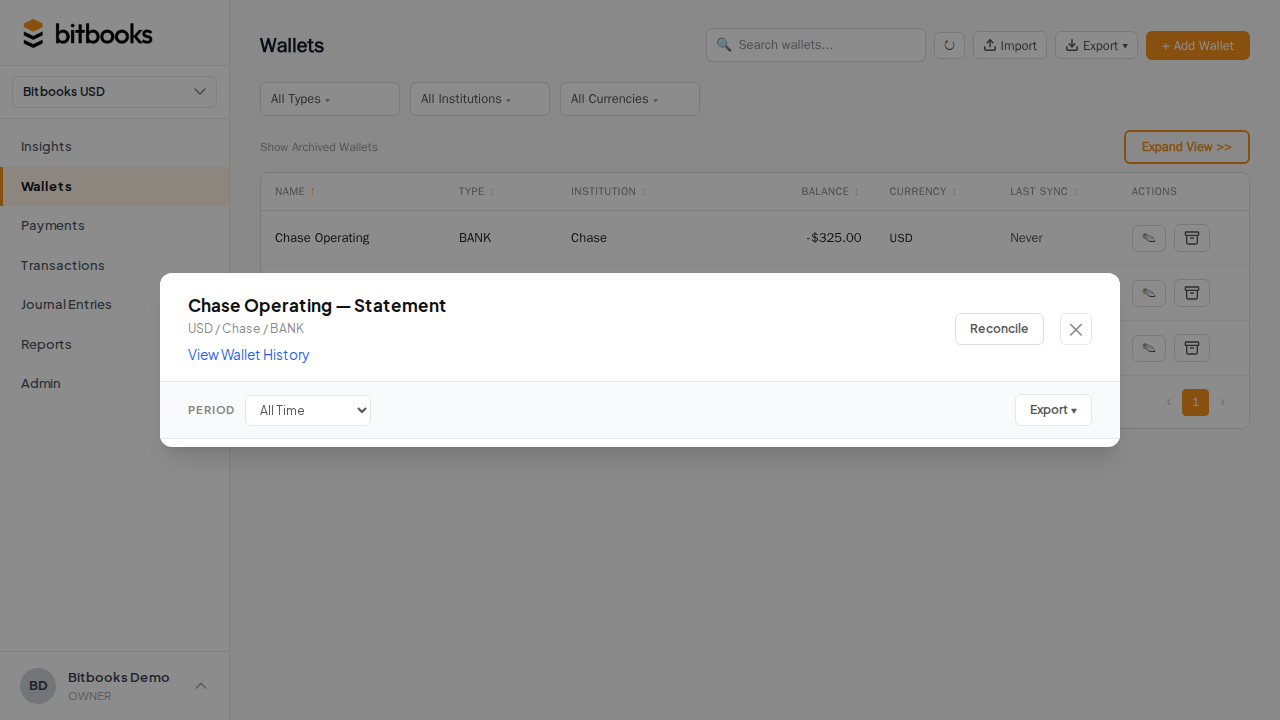
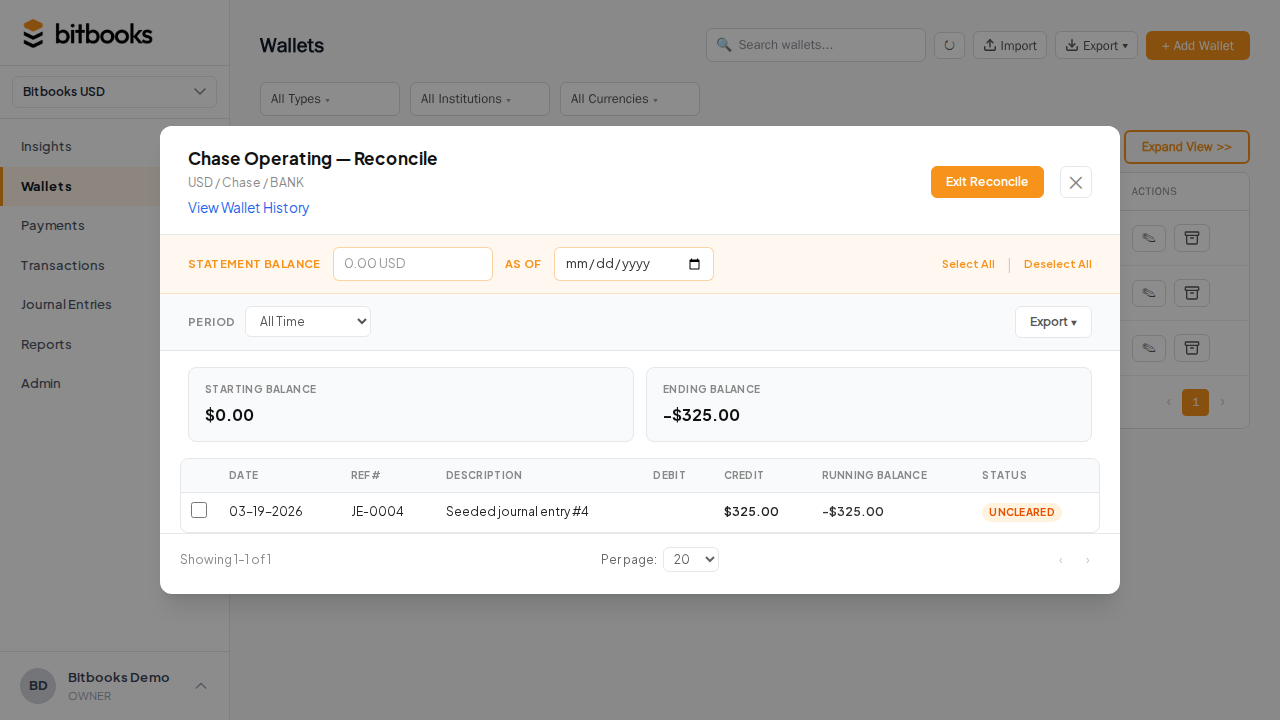
The screen shows:
- Beginning balance (what was in the wallet at the start of the period)
- All transactions in the period for this wallet
- Calculated ending balance (start + net activity)
You'll compare the calculated ending balance against the actual ending balance at the wallet provider.
The matching workflow
For each transaction, you check against the provider's record. Three cases:
Match found, exact
The transaction in BitBooks corresponds to a transaction at the provider. Same date, same amount, same direction. Tick it as reconciled.
Match found, close but not exact
Date is right, amount is slightly off (e.g., a fee miscount). Investigate the difference. Usually one of two things:
- BitBooks recorded the gross, the provider recorded the net (or vice versa)
- A fee that BitBooks didn't capture as a separate line
Reconcile only after the difference is explained. If it's a real difference (like a fee you forgot to record), add the missing entry first.
No match
The transaction in BitBooks doesn't exist at the provider, or vice versa. Don't reconcile. Investigate the discrepancy.
If a transaction exists in BitBooks but not at the provider: probably a duplicate, a wrong-wallet entry, or a manual entry that was already auto-synced. Delete or reverse the BitBooks entry.
If a transaction exists at the provider but not in BitBooks: probably a sync gap. Trigger a sync, or enter the missing transaction manually.
Auto-syncs make this easier
For a wallet connected via Bitcoin Connections:
- Make sure auto-sync is current (last synced today)
- Most transactions will be Cleared already
- Reconciliation is mostly: tick all the Cleared transactions for the period, save
The auto-sync did the heavy lifting. Reconciliation is the verification step.
For a wallet you track manually, expect more work. You'll be ticking each one against the provider's history.
Verifying the ending balance
The most important check at the end:
BitBooks ending balance: 1.45 BTC
Provider ending balance:  1.45 BTC
Difference:               0.00 BTC ✓
If they match: reconcile and move on.
If they don't match, investigate before reconciling. The difference is your puzzle. Common sources:
- A transaction in BitBooks that shouldn't be there (duplicate, manual entry that's also in auto-sync)
- A transaction missing from BitBooks (sync gap)
- A wrong amount on a BitBooks entry (typo, fee miscount)
- An incorrect opening balance (was wrong from the start of the period)
See Finding and Fixing Discrepancies for the full diagnostic flow.
Saving the reconciliation
After matching everything:
- Confirm the calculated ending balance matches the provider's
- Tick all the transactions you've matched
- Click Save Reconciliation (or similar)
Each ticked transaction's cleared status changes to Reconciled. The wallet records the reconciliation event with the date, the user, and the period covered.
The reconciled period and balance are recorded so future reconciliations start from this verified point.
Common scenarios
Reconciling Blink for the past month
Most efficient case. Blink auto-syncs to BitBooks. By month-end, all Lightning sales and any on-chain moves are already in BitBooks as Cleared. Reconciliation is:
- Open the wallet, click Reconcile
- Confirm the ending balance matches
- Tick all, save
Should take 5-10 minutes for a typical Blink wallet.
Reconciling cold storage (manual)
You don't auto-sync cold storage. Reconciliation here means:
- Open the wallet in BitBooks
- Open your hardware wallet (or the on-chain explorer with your xpub) in another tab
- Compare transaction by transaction
- Verify the ending balance matches
- Tick and save
For cold storage that's rarely touched, this might be a quick check (one transaction or none for the month). Otherwise it's careful matching.
Reconciling a high-volume Lightning operation
If you have 1,000+ Lightning transactions in a month: spot-check rather than tick every one.
- Verify the ending balance matches
- Spot-check 10-20 random transactions
- Reconcile the period as a block ("All transactions in this period are Reconciled")
This is acceptable for high-volume tracking where individual matching is impractical.
After reconciling
The reconciled transactions are now extra-locked (can't be edited even by Admin). The wallet shows a "reconciled through [date]" indicator.
If anyone tries to edit a reconciled transaction, BitBooks blocks it and explains why.
If you discover later that a reconciliation was wrong, you can un-reconcile. It's logged in the audit trail. Then fix and re-reconcile.
Common questions
"Do I have to reconcile every month?"
No, but most accountants strongly recommend it. The longer you wait, the harder the diff is to investigate.
"What if I missed reconciling for several months?"
Reconcile each month in order, oldest first. Some discrepancies are easier to spot in the month they happened.
"Can I reconcile two wallets at once?"
Each wallet is reconciled separately. The "all wallets" reconciliation pattern doesn't exist; each wallet has its own statement and its own match.
Where to go next
- What is Bank Reconciliation? for the broader concept
- Reconciling a Fiat Bank Account for fiat-side reconciliation
- Cleared, Uncleared, and Reconciled Transactions for status details
- Finding and Fixing Discrepancies for troubleshooting
- Period Close for what to do once reconciled