What this is
Same as reconciling a Bitcoin wallet, applied to a traditional bank account or credit card. You compare your bank's monthly statement against the transactions in BitBooks, match them up, and lock in.
For the broader concept, see What is Bank Reconciliation?.
Before you start
Have these ready:
- Your bank statement for the period (PDF or downloadable CSV/OFX from the bank's website)
- The bank's ending balance for the statement date
- All BitBooks transactions for this account up to date (no Drafts pending review)
For a credit card: same idea, but instead of bank statement use the card's monthly statement.
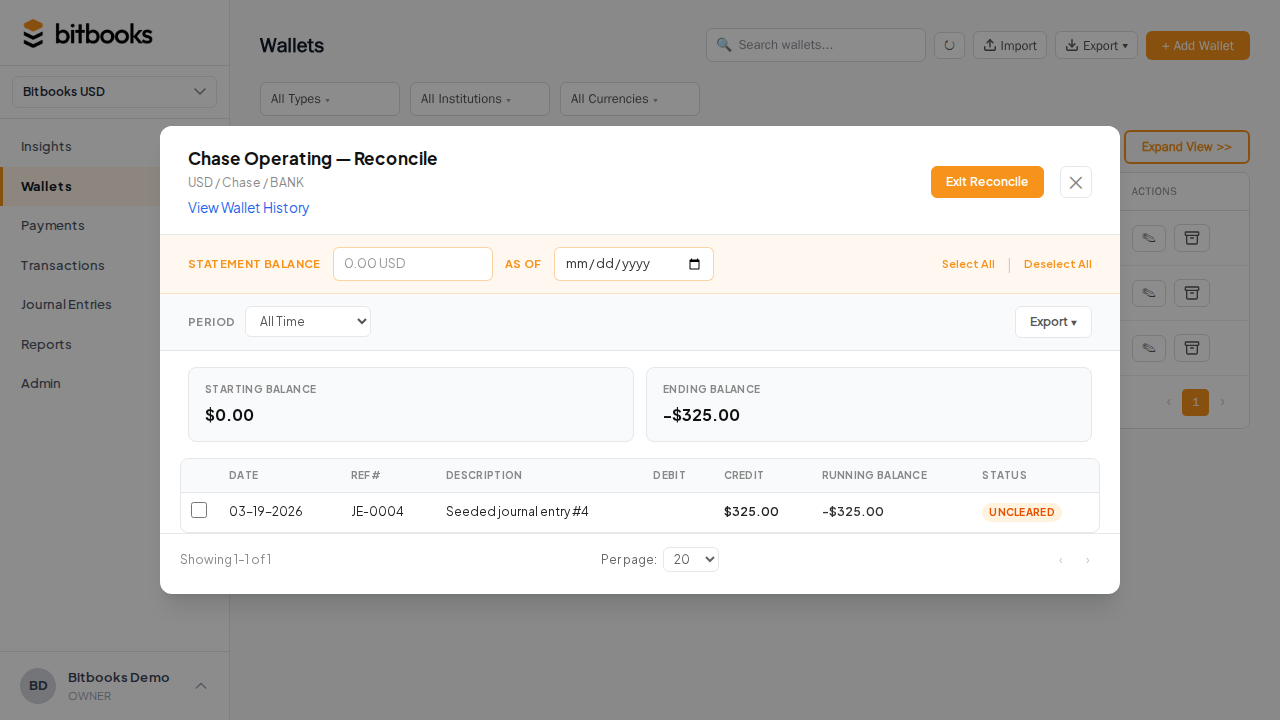
Open the reconciliation screen
- Click Wallets in the sidebar
- Click the bank account or credit card wallet
- Click Reconcile (or Statement)
- Pick the statement period (e.g., last calendar month)
The screen shows BitBooks' beginning balance, every transaction in the period, and the calculated ending balance.
The matching workflow
Same as Bitcoin wallets. For each transaction:
- Find it on the bank statement. Same date, same amount, same direction.
- Match. Tick it as reconciled.
- Investigate if it doesn't match.
The bank statement and BitBooks should agree on:
- The number of transactions in the period
- The total of debits (money out)
- The total of credits (money in)
- The ending balance
If all four agree, you're aligned.
Common bank-specific issues
A few things that show up specifically with bank accounts:
Bank fees not in BitBooks
Most banks deduct service fees, ATM fees, foreign transaction fees, etc. directly from your account. If you didn't enter them in BitBooks, your books will be off by the fee amount.
Add them as expense transactions: wallet = the bank account, direction = money out, category = "Bank Fees" (under General & Administrative), amount = the fee.
Many businesses add these in bulk after seeing the bank statement, since the statement is when you first see them.
Interest credited
Banks credit interest periodically. Same idea as fees, but money in. Category = "Interest Income" (under Other Income).
Returned items / NSF
If a customer's check bounced or a deposit was reversed, the bank shows it as a debit. Record this in BitBooks too: a money-out transaction that mirrors the original (or use the Reverse function on the original deposit if appropriate).
Pending vs posted at the bank
Most banks have a "pending" tier (transactions in flight). Pending transactions might appear on the bank's online view but not on the official monthly statement. Reconcile against the official statement, not the live online view.
In BitBooks: pending transactions you've already entered should be marked Cleared status = Not Cleared until they show as posted at the bank.
Credit cards specifically
A credit card "wallet" tracks money you owe, not money you have. The balance is a liability, not an asset.
Reconciliation works the same way:
- Match each charge against the credit card statement
- Confirm the ending balance matches
- Reconcile
The credit card balance grows when you charge (a debit on the card account in BitBooks's books). It shrinks when you pay (a credit, when the payment goes through).
For the monthly card payment itself: that's a separate transaction (transfer from your bank to the credit card wallet, reducing the balance).
Importing the bank statement to speed up reconciliation
Most banks let you download statements as CSV or OFX. BitBooks can ingest these:
- Go to the wallet's detail page
- Click Import Transactions
- Upload the file (CSV, OFX, or QFX)
- Map the columns if needed
- The transactions land as Drafts, ready to review and post
If you've already entered most transactions manually, the import will create duplicates. The cleanest path:
- Don't double-enter. If you import, don't also enter manually
- Or dedupe: after import, delete the manual duplicates
After importing, do a final reconciliation pass to lock in the imported transactions as Reconciled.
See Importing Bank Statements (CSV) for the import-specific walkthrough.
A worked example
Your business checking account at Chase. February 2026.
Beginning balance per BitBooks (Feb 1): $12,500 Ending balance per BitBooks (Feb 28): $14,800 Ending balance per Chase statement (Feb 28): $14,775
Difference: $25.
You scroll through the statement looking for unmatched items. You find:
- An ACH credit on Feb 12 for $25 that BitBooks doesn't have
You investigate. It's an interest credit from Chase ("0.00% APY interest"). You missed it because Chase auto-credits interest without a notification.
You record it in BitBooks: money-in $25, category "Interest Income," date Feb 12. Save and post.
New BitBooks ending balance: $14,800 + $25 = $14,825. Wait, that's MORE off than before. Something's wrong.
Let me redo. If your initial BitBooks said $14,800 and the bank says $14,775, BitBooks is HIGHER than the bank by $25. That means you're claiming $25 you don't actually have.
Likely cause: a transaction in BitBooks that didn't actually happen at the bank. Look for a deposit you entered manually that the bank doesn't show. Or a fee you missed.
Or: the bank charged you a $25 fee you didn't enter. Money out at the bank that BitBooks doesn't have. Add the fee. New BitBooks balance: $14,800 - $25 = $14,775. Matches.
This is the kind of detective work reconciliation involves. Most months are simpler.
After reconciling
Same as Bitcoin wallet reconciliation: ticked transactions become Reconciled, the wallet records the period as reconciled, future activity starts from the verified balance.
For the next month, the beginning balance for reconciliation is exactly what was in the wallet at the end of the previous reconciliation. They chain.
Common questions
"My business has 5 bank accounts. Do I reconcile all of them every month?"
Yes. Each account is separate. Set aside an hour at month-end to do all five.
"My bank only sends statements quarterly. Should I reconcile quarterly?"
Better to reconcile monthly anyway, using your online statement view as the source of truth. Quarterly statements catch bigger errors slower; monthly is the standard.
"What if my bank's CSV uses different column names than BitBooks expects?"
The import flow lets you map columns at upload time. BitBooks tries to guess; you can override.
Where to go next
- What is Bank Reconciliation? for the broader concept
- Reconciling a Bitcoin Wallet for the Bitcoin version
- Importing Bank Statements (CSV) for bulk import flow
- Finding and Fixing Discrepancies for troubleshooting