What reconciliation is, in everyday terms
Reconciliation is the act of comparing two records of the same thing and checking they agree.
Your wallet provider (Blink, your bank, Coinbase, etc.) keeps its own record of your transactions. BitBooks keeps a separate record. Reconciliation is when you sit down with both and verify that what BitBooks says happened actually happened, in the right amount, on the right date.
Think of it like checking your credit card receipts against the statement at the end of the month. You go line by line. Each charge: yes that was me at Starbucks, yes that was me at the grocery store, yes that was the gym. Anything that doesn't match (a charge you don't recognize, a receipt that's missing) gets investigated.
That's reconciliation.
Why it matters
Reconciliation does three things:
- Catches errors. A duplicate import, a typo, a missed transaction, a fraudulent charge. Reconciliation finds them before they accumulate.
- Verifies the numbers you trust. Your reports are only as good as the data underneath. Reconciliation is how you know the data is right.
- Marks transactions as real. Once you've matched a transaction in BitBooks to its counterpart at your wallet provider, you mark it Reconciled. Your books and your wallet provider now formally agree.
For tax filings, audits, and anything else that requires reliable financial records, reconciliation is what makes those records reliable.
The three states a transaction can be in
Every transaction in BitBooks has a Cleared status with three possible values:
| Status | What it means |
|---|---|
| Not Cleared | Recorded in BitBooks. Hasn't been confirmed as real by checking against the provider. |
| Cleared | Confirmed as real (the transaction has settled at the wallet provider). |
| Reconciled | Cleared and you've matched it during a formal reconciliation session. |
Most transactions start as Not Cleared, become Cleared automatically once the wallet syncs (or when you manually mark them), and become Reconciled when you do a reconciliation.
Reconciled is the final state. Once a transaction is Reconciled, it usually shouldn't change, ever.
When to reconcile
Most businesses reconcile each wallet monthly. The standard cadence:
- First few days of the new month, your wallet provider produces last month's statement
- You open BitBooks and reconcile your wallet against that statement
- Once reconciled, you can safely close the month (see Period Close)
- Repeat next month
Why monthly? Because:
- It's a natural break point (matches calendar reporting)
- Errors are easier to investigate when fresh
- Tax filings are calendar-based
- Most accounting workflows assume month-by-month rhythm
Some businesses reconcile more frequently (weekly or even daily for high-volume Lightning operations). Some go quarterly. Pick what works, and stick with it.
What to compare against
For Bitcoin wallets:
- Blink, Strike, Coinbase, etc.: the wallet provider's transaction history. Most providers let you export this as CSV.
- Hardware wallets, self-custodial wallets: the wallet's own log, or the on-chain history if you can identify your addresses.
- Cold storage: typically reconciled less frequently (quarterly or annually) since transactions are rare.
For fiat accounts:
- Bank checking/savings: the monthly statement
- Credit card: the monthly statement
- PayPal/Stripe/etc.: the platform's transaction export
The reconciliation process in BitBooks
Open the wallet you want to reconcile (Wallets → click wallet name). Look for the Statement or Reconcile action.
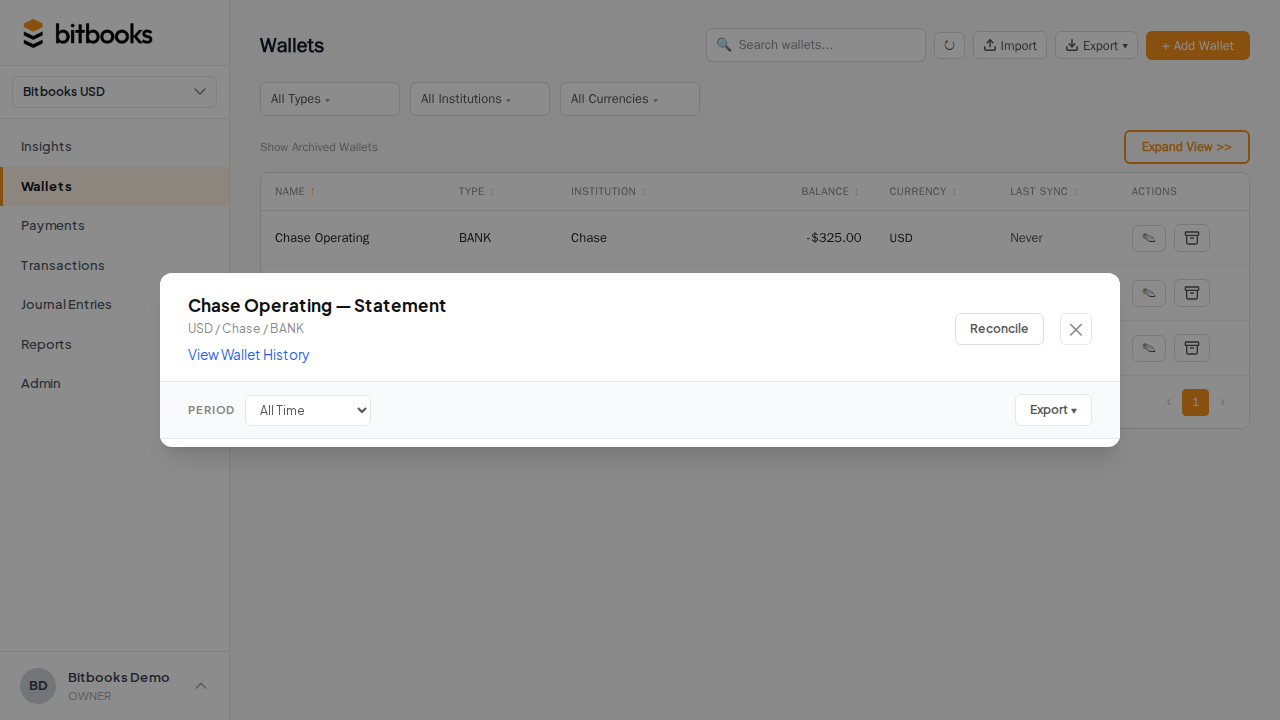
You'll see:
- All transactions in BitBooks for this wallet during the period you pick
- The wallet's beginning balance (what was in it at the start)
- The expected ending balance (start + net activity)
Now compare this against the provider's actual ending balance. Three possibilities:
A) The two ending balances match
You're done. Tick all the transactions, mark them Reconciled, save. The wallet is now reconciled through that date.
B) BitBooks balance is higher than the provider's
Possible causes:
- A transaction in BitBooks that didn't actually happen (e.g., you typed it in by hand and got the amount wrong)
- A duplicate (the auto-sync imported a transaction that you'd already entered manually)
- A reversal you entered but the provider doesn't show
Find and fix.
C) BitBooks balance is lower than the provider's
Possible causes:
- A transaction at the provider that didn't import (sync didn't catch it)
- An incorrect amount on a BitBooks entry (entered too small)
- An opening balance set wrong
Find and fix.
Doing the comparison
The slower-but-thorough method:
- Sort transactions in both views by date
- Go top to bottom, ticking each pair (BitBooks transaction matches provider transaction)
- Anything left unticked at the end is the discrepancy
The faster method (when most transactions auto-imported):
- Filter to "Not Cleared" transactions only
- Skim through, tick the ones you can see in the statement
- Investigate the few that don't match
For a Bitcoin wallet that auto-syncs, you'll usually find that 95% of transactions match without any work, and you spend most of your time on the few that don't.
What "Reconciled" gets you
Once a transaction is marked Reconciled:
- It can't be deleted (preserves the audit trail)
- It can't be edited in ways that would invalidate the reconciliation (amount, date, account, wallet are locked)
- The wallet's reconciled balance updates so you can see where you reconciled to
If you absolutely need to change a Reconciled transaction (e.g., you reconciled wrong), you'll need to first un-reconcile it. This breaks the reconciliation chain after that point and means you'll need to re-do the reconciliation from there forward. Don't do this casually.
Common questions
"What if a transaction is Pending at my provider but I already see it in BitBooks?"
Mark it as Cleared (not Reconciled) for now. When the provider settles it, the status at the provider matches BitBooks, and you can include it in the next month's reconciliation.
"My provider has a transaction BitBooks doesn't. What do I do?"
Run a manual sync first (Wallets → wallet → Sync Now). If it still doesn't appear, the auto-sync may have a bug or skipped a record. You can either:
- Wait and try a sync again later (most issues are transient)
- Add the transaction manually in BitBooks if you need to close out the month
If transactions keep going missing, contact support. Sync should be reliable.
"Can I reconcile partway through a month?"
Yes. Reconciliation isn't tied to month boundaries. It's any date range. But matching to a calendar month is conventional because it lines up with statements and reports.
"What about wallets I created manually (no auto-sync)?"
Same process. You compare BitBooks transactions against whatever record the provider gives you (or your own log of what happened, for cash). The mechanics are identical, just no auto-sync to lean on.
A real example
Maria runs a Bitcoin coffee shop. On February 3rd, she sits down to reconcile her January Blink wallet.
- January 1 starting balance: 0.05 BTC (matches Blink)
- January transactions in BitBooks: 124 entries totaling 1.85 BTC in, 0.43 BTC out
- January 31 ending balance per BitBooks: 1.47 BTC
- January 31 ending balance per Blink: 1.45 BTC
- Difference: 0.02 BTC
She investigates. She finds:
- One transaction for 0.02 BTC that her staff member typed in by hand on January 18
- Looking at Blink, that exact transaction is also there (auto-imported)
So this is a duplicate. She deletes the manual entry. New BitBooks balance: 1.45 BTC. Matches Blink.
She ticks all 124 transactions, marks them Reconciled, saves. January is now reconciled. She can close the period.
The whole process took 25 minutes. Without reconciliation, she'd have a 0.02 BTC error in her books that would propagate forward forever and never get caught.
Where to go next
- Cleared, Uncleared, and Reconciled Transactions for the deeper status explanation
- Reconciling a Bitcoin Wallet for the step-by-step Bitcoin specifics
- Reconciling a Fiat Bank Account for traditional bank account specifics
- Finding and Fixing Discrepancies for troubleshooting
- Period Close for what to do once your wallets are reconciled